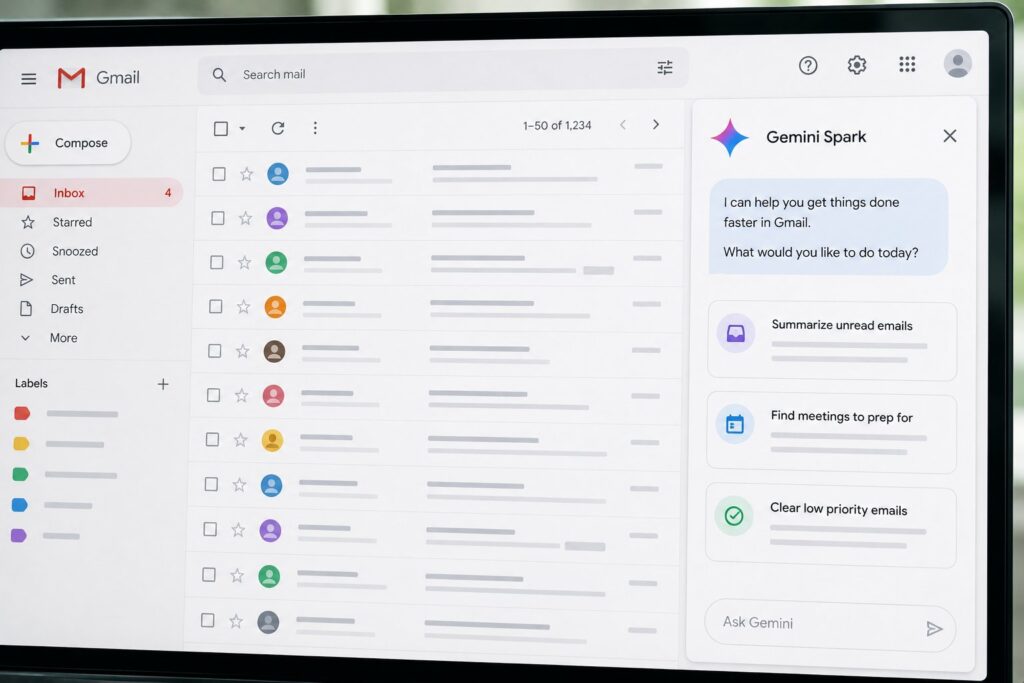
The phrase "agentic inbox" has been on every email vendor’s roadmap for two years. The vision is consistent: AI that does meaningful inbox work without requiring the user to compose every prompt. The execution has been the hard part. Google’s Gemini Spark, released to general availability in April 2026 after a six-month preview, is the most cohesive realization of the vision shipped by any major vendor to date. The Gmail integration is the surface where the agentic capabilities are most visible and where the practical limits of the current generation of agentic inbox products are most legible. This piece walks through what Spark actually does inside Gmail, what patterns are working in production use, and where the rough edges still are.
The short version is that Spark + Gmail in mid-2026 is a useful assistant for inbox work that previously required substantial human attention, with a clear boundary between what it surfaces for user approval and what it will execute autonomously. The autonomous surface is intentionally narrow. The surfaced-for-approval surface is broad and well-designed. The patterns that have proven to work in production are mostly composition workflows, calendar-aware coordination, and proactive follow-up surfacing. The patterns that have not yet matured are autonomous response sending, multi-message conversational sequences, and integration with non-Google external systems.
What Spark is, briefly
Gemini Spark is Google’s personal-AI agent, positioned alongside Antigravity (the developer-focused agentic IDE) and AI Studio (the prototype-and-API surface) as the consumer-facing product in Google’s agentic-AI portfolio. Spark runs on Android, iOS, the web, and inside the Google Workspace surfaces (Gmail, Calendar, Drive, Docs, Meet, Sheets). It uses Gemini 3 Pro as its primary model with selective fallback to Gemini 3 Flash for latency-sensitive operations.
Spark’s architectural distinction is that it has access to the user’s Google data through Google’s own authenticated channels rather than through the user pasting context into a chat window. The user’s Gmail messages, Calendar events, Drive documents, Contacts entries, and Photos are visible to Spark with the user’s permission and through Google’s existing data-access framework. This is the architectural advantage that Gmail has over a third-party AI assistant: the AI is inside the system that has the data, not outside it asking for context.
The Gmail integration is the highest-touch Spark surface for most users because email is where most users spend most of their attention. The integration is exposed through a Spark panel on the right side of the Gmail web interface, a Spark icon in the mobile Gmail apps, and an "Ask Spark" affordance inside any open email thread. The user can address Spark with explicit prompts, and Spark surfaces proactive suggestions based on inbox state.
Inbox triage
The first capability that most users encounter is inbox triage. When a user opens Gmail with Spark enabled, the inbox view includes a "Spark summary" at the top showing what has arrived since the last visit. The summary is organized by topic and sender importance rather than by chronological order. A typical summary reads something like: "Three messages from your team about the Q3 launch plan. One newsletter you usually read. Two transactional confirmations you can probably skip. One message from your manager that needs a reply this week."
The categorization is computed at fetch time and updated as new messages arrive. The categories are not fixed: Spark adjusts them to the user’s email patterns over time. A user who frequently corresponds with a particular customer will see that customer’s messages categorized separately from general external mail. A user who reads certain newsletters will see those distinguished from newsletters they ignore.
The triage surface includes a "Mark these as not important" action and a "Read this for me" action. The not-important action trains Spark’s future triage and also (with explicit user confirmation) suggests a Gmail filter rule that future similar messages will be auto-categorized. The read-this-for-me action produces a one-paragraph summary of the message contents and a suggested set of actions: reply with a specific tone, forward to a specific person, archive, or schedule a follow-up reminder.
The triage feature is the lowest-friction Spark capability and the one that most users adopt first. The user effort is approximately zero: open Gmail, see the summary, take action or scroll past. The agentic capability is real but the user-surface friction is minimal.
Draft generation
Draft generation is the most-used Spark capability. Inside any email thread, the "Reply with Spark" affordance produces a draft response based on the thread’s content, the user’s writing style (learned from sent-mail history), and any explicit guidance the user provides. The generated draft appears in the compose window, the user reviews and edits, and the user explicitly sends. Spark does not send drafts autonomously.
The draft generation has several distinguishing properties. The first is context-awareness across surfaces. Spark can pull information from the user’s Drive documents, Calendar events, and Contacts to inform a reply. A reply to "what time works for our meeting next Thursday?" will reference the user’s actual Calendar availability and propose specific time slots. A reply to "can you send me the proposal we discussed?" will offer to attach a relevant Drive document if Spark can find one that matches the conversation context.
The second is tone matching. Spark learns from the user’s sent mail what tone they tend to use with specific recipients (formal with a particular client, casual with a particular colleague, brief with a particular vendor). The generated draft adapts to the recipient’s expected tone. The tone matching is per-relationship rather than global, which is a meaningful improvement over earlier generation AI writing assistants that produced a single uniform tone.
The third is awareness of conversational history. A reply to the latest message in a thread is generated in the context of the whole thread, not just the last message. If the thread includes a commitment the user made in a previous reply, the new reply acknowledges that commitment. If the thread includes a question that was asked and not yet answered, the new reply addresses it.
The fourth is attachment awareness. If the incoming message has an attachment, Spark reads the attachment and incorporates it into the draft. A draft response to "can you check the numbers in this spreadsheet?" will reference the actual numbers in the spreadsheet. A draft response to "let me know what you think of this proposal" will summarize the proposal’s content in the reply. The attachment-reading is opt-in per draft, which the user can disable for confidential attachments they do not want Spark to see.
Calendar-aware scheduling
Spark’s calendar integration deserves its own discussion because it is the capability that has shifted the most workflows for users who do significant scheduling work. Inside an email about a meeting, Spark can propose specific times based on the user’s actual Calendar availability, taking into account working hours, existing commitments, focus blocks, and the user’s preference patterns (some users avoid back-to-back meetings; some avoid mornings; some prefer Tuesday afternoons).
The scheduling surface offers three levels of agentic behavior. The first level is "suggest times for me to propose." Spark generates three to five candidate time slots and the user picks which ones to include in the reply. This is the most common pattern because it gives the user editorial control over what gets sent.
The second level is "propose times to the recipient." Spark generates a reply that proposes specific times, the user reviews the draft, and the user sends. This is slightly more agentic but still requires user approval before sending.
The third level is "set up the meeting and add it to the calendar." When the recipient replies confirming a time, Spark detects the confirmation, creates the Calendar event, sends the invite, and surfaces a notification to the user that the meeting is on the calendar. This level is opt-in per-recipient and is most useful for users who do high volumes of scheduling with the same set of people.
The calendar integration is the most-loved Spark capability among users who do significant scheduling. It is also the capability that most clearly illustrates Spark’s architectural advantage: Google’s own data access lets Spark see the user’s actual calendar and proposed meetings in real time, not through a hand-curated context paste.
Follow-up tracking
Spark’s follow-up tracking is the capability that has shifted inbox workflow for users who deal with high message volumes. The feature surfaces two types of follow-ups proactively. The first type is "you owe a reply": emails the user has not yet responded to where Spark has determined a reply is expected. The determination is based on the message content, the conversational pattern, and Spark’s model of the user’s relationship with the sender. A boss’s "let me know what you think" message gets flagged as needing a reply. A newsletter is not flagged.
The second type is "you are waiting on a reply": emails where the user has asked a question or made a request, more than a configurable interval has passed (default 5 business days), and no reply has arrived. Spark surfaces these as a list with the option to send a follow-up. The follow-up draft is generated in a tone that acknowledges the previous unanswered message without being pushy. The user reviews and sends, the same as for any other draft.
The follow-up surface is the capability that has been most enthusiastically adopted by users who deal with large numbers of stakeholders. The cognitive overhead of remembering who owes a reply on what has been a long-standing friction of professional email. Spark’s follow-up tracking moves that overhead from human memory to AI surfacing.
A second-order effect is that some users have reduced their use of separate follow-up tools (Boomerang, Streak, FollowUp.cc) that previously provided similar functionality. The integration of follow-up tracking directly into the Gmail surface means the friction of using it is approximately zero, where the friction of using a separate tool was always meaningful.
The autonomous boundary
A consistent design choice in Spark + Gmail is that autonomous actions (actions Spark takes without explicit user confirmation) are narrowly scoped. The autonomous actions are: classifying inbox messages, generating drafts (the user must review and send), surfacing follow-up suggestions, and reading the user’s own Google data to inform other actions. Everything that affects the outside world (sending email, creating calendar events that other people see, sharing documents, replying to messages) requires explicit user confirmation.
The design choice has been debated. Some users want a more aggressive autonomous surface where Spark can send replies on the user’s behalf for low-stakes messages (routine confirmations, scheduling agreements, simple acknowledgments). Google has resisted this expansion, citing the risk of incorrect autonomous actions affecting professional relationships and the difficulty of recovering from a wrong autonomous action.
The middle ground Spark has settled on is "configurable autonomy by recipient and by action." A user can configure that for specific recipients, Spark may send simple acknowledgments autonomously. The configuration is per-recipient and per-action, not global. The default for any new recipient is no autonomous action. This is the right default for the current state of agentic AI reliability and the current state of user trust in AI handling outbound communication.
What does not yet work well
Several categories of inbox work that the agentic inbox vision suggests should be possible are not yet well-supported by Spark + Gmail. The first is multi-message conversational sequences. Spark can generate one draft at a time, but it does not yet handle a back-and-forth conversation flow autonomously. A scheduling conversation that requires three or four message exchanges still requires the user to engage with each round.
The second is integration with non-Google external systems. Spark can read the user’s Drive documents and Calendar events but cannot, for example, look up information in the user’s Salesforce account or check the status of an issue in the user’s Jira instance. Google has announced that this integration surface will expand via the Gemini Enterprise Agent Platform, but the surface is limited in mid-2026 to what Google’s own data sources expose.
The third is reliable handling of long conversational histories. Threads that have accumulated dozens of messages over months or years can confuse Spark’s context-awareness. The reply generation in long threads tends to focus disproportionately on the most recent messages and miss commitments or decisions made earlier in the thread. The mitigation pattern that has emerged is to summarize the long thread before asking Spark to compose a reply: a user can ask "summarize this thread" first, review the summary, and then ask "now draft a reply that addresses [specific point]."
The fourth is handling of attachments in formats Spark does not fully understand. Spark reads PDFs, spreadsheets, and Google Docs well. It reads Word documents, slide decks, and some other formats less well. It does not read images for content in the way it reads text documents (it can describe the image but does not parse data out of it). Attachment-aware replies for non-text-document attachments are less useful than the text-document case.
Privacy and data handling
A Gmail integration that reads the user’s mail content has privacy implications that are worth being explicit about. Spark’s access to Gmail content runs through the user’s existing Google account permissions. The user explicitly enables Spark for Gmail through a settings toggle. Once enabled, Spark has read access to message content and metadata for the purposes of the features described above.
Google’s published policy is that Spark’s inbox processing happens on the user’s behalf and the contents are not used to train Google’s foundation models. This is the same boundary Google has maintained for the Gmail content access by other Google services for several years. The policy is verifiable to the extent that anyone can verify a policy claim (which is to say, less than ideally, but the policy is at least explicit and the same standard that has applied to other Gmail integrations).
For enterprise Workspace customers, Spark inherits the customer’s Workspace data-handling controls. Customers on Workspace Enterprise can configure whether Spark is available to their users, can audit Spark’s data access, and can apply existing Workspace DLP rules to Spark’s outputs. The enterprise-control surface is the same one that applies to other Workspace AI features.
Users with privacy-sensitive workloads have configurable opt-outs. A user can disable Spark for specific message categories (everything from a specific domain, anything marked confidential), disable Spark globally for specific threads (one-click "exclude this thread"), or disable Spark for Gmail entirely while keeping it enabled for other surfaces. The opt-outs are per-feature rather than all-or-nothing, which is the right design for users who want some Spark capabilities and not others.
What this means for inbox workflow
The cumulative effect of Spark + Gmail on inbox workflow is meaningful for users who do significant email work. The triage feature reduces the cognitive overhead of opening an inbox with many unread messages. The draft generation feature reduces the time-to-send for routine replies. The calendar integration reduces the friction of scheduling. The follow-up tracking surfaces commitments that would otherwise be forgotten.
The cumulative effect is also somewhat smaller than the agentic inbox vision originally suggested it would be. Spark does not yet remove the user from the inbox in any meaningful way. The user still opens Gmail, still reads messages, still reviews drafts, still sends mail. What changes is what the user does inside that workflow: less typing, less scheduling math, less search for documents to attach, less remembering of who owes whom a reply.
The honest reading is that Spark + Gmail is the first agentic inbox product that delivers practical value at scale, and that the value it delivers is incremental rather than transformative. The transformation that "the AI handles my inbox" implies is not yet what Spark does. What Spark does is make the inbox work less effortful, which is a meaningful improvement even if it is not the full vision.
Frequently asked questions
Is Spark available on Google Workspace and on personal Gmail accounts?
Yes. Spark is available on both. The capabilities are similar across surfaces, with enterprise-specific features (admin controls, audit logs, DLP integration) only on Workspace Enterprise plans.
Can I use Spark on other email providers besides Gmail?
No. Spark’s Gmail integration is specific to Gmail and depends on Google’s data-access framework. Spark has surfaces for other Google products but does not integrate with non-Gmail email providers.
Does Spark read messages I have not yet opened?
Yes, for triage and follow-up tracking purposes. Spark’s triage summary is computed across unopened messages so the summary can describe what arrived. The processing happens on Google’s servers and the contents are not exposed to anyone but the user (per Google’s published policy).
Can I disable Spark for specific senders?
Yes. The “exclude this sender from Spark” option appears in the Spark settings panel and can be set per-sender or per-domain. Excluded senders’ messages are not processed by Spark.
Does Spark work with Gmail’s confidential mode messages?
Spark can compose confidential mode messages on the user’s behalf, but it does not process confidential mode message contents the user receives. Confidential mode is end-to-end at the Gmail layer and Spark is treated as another reader for the purposes of confidential mode’s access controls.
Can Spark write filters and rules in Gmail?
Yes. Spark can suggest Gmail filters and rules based on observed inbox patterns, and the user can accept or modify the suggestion. Spark does not create filters or rules autonomously.
How does Spark handle messages in languages I do not speak?
Spark works in all the languages Gemini 3 Pro supports (currently over 100 languages). The triage and draft generation surfaces are language-aware: Spark will surface a multi-language inbox correctly and generate replies in the recipient’s expected language. The model’s language quality varies by language; the major languages are well-supported and the long tail varies.
Will the Spark + Gmail integration affect my Gmail storage usage?
No directly. Spark’s processing happens server-side and does not store additional content in the user’s Gmail account. The processing metadata (what Spark has read, what categorizations have been applied) is stored in the Spark service’s own data store and counts against the user’s overall Workspace storage but not specifically against Gmail’s storage allocation.