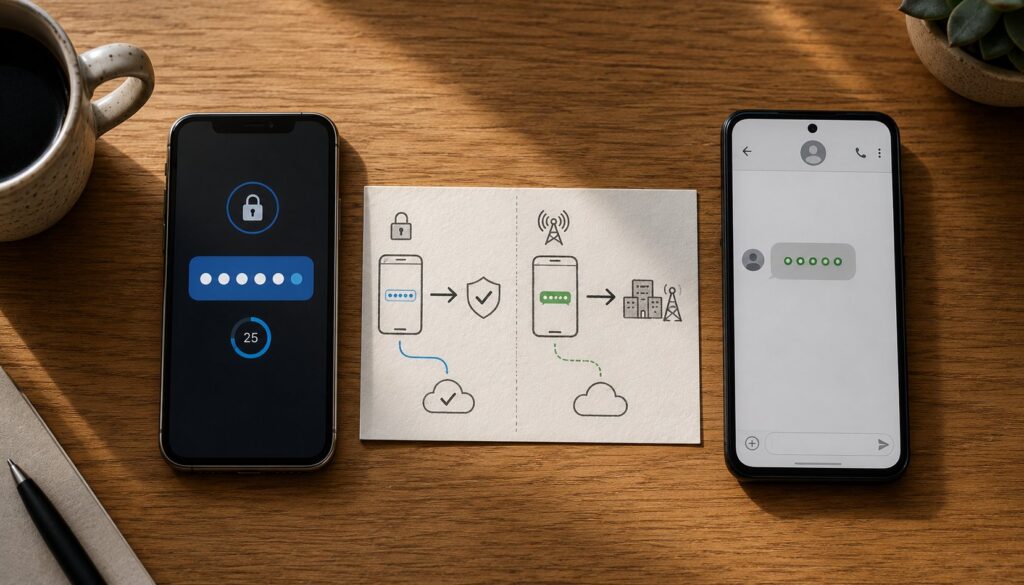
The question that comes up almost every time someone configures their first authenticator app is the right question to start this post with. If the authenticator app still produces a six-digit code on your phone, and SMS-based two-factor authentication also produces a six-digit code on your phone, then what is the substantive security difference between the two? Are we just adding friction to feel more secure, or is there an actual reason to set up an authenticator app instead of using SMS codes? The answer is that there is a substantive security difference, the difference is meaningful for the threats that matter most in 2026, and understanding the difference is the foundation for understanding the broader multi-factor authentication picture including passkeys and hardware security keys.
This piece walks through what authenticator apps actually do under the hood, the specific threats that motivated the move from SMS to authenticator apps, the SS7 protocol weakness that makes SMS interception possible without ever touching the user’s device, the SIM swapping attack pattern that has been responsible for some of the largest publicly-disclosed credential thefts in the past five years, the broader multi-factor authentication threat model, and the practical decision framework for which factor combinations to use for which kinds of accounts. The piece is written for the technically-curious user rather than the security professional; the goal is to make the substantive answer accessible to readers who deserve more than "just trust us, do MFA."
The short version is that the authenticator app’s six-digit code is generated locally on your phone from a secret that was shared with the service you’re logging into when you first set up MFA. The code never travels over any network to reach you. The SMS code, in contrast, is generated on the service’s servers and travels through the carrier infrastructure to reach your phone, and that journey is the part that can be intercepted or redirected by attackers. The substantive answer is "the TOTP secret never goes over the wire."
What multi-factor authentication actually is
Before getting into how authenticator apps differ from SMS, the broader MFA picture needs to be clear. Multi-factor authentication (MFA), sometimes called two-factor authentication (2FA), is the security pattern where logging into an account requires more than one independent piece of evidence that you are who you say you are. The pattern is based on the observation that any single piece of evidence (a password, a phone, a fingerprint) can be compromised, and that requiring two or more independent pieces dramatically reduces the chance that an attacker has all of them.
The classical three categories of authentication factors:
Something you know. A password, a PIN, a passphrase, the answer to a security question. The defining property is that the user has it in their memory and can produce it on demand. The risk is that it can be guessed, phished, leaked through a data breach, or shared with others.
Something you have. A physical object the user possesses. A phone, a hardware security key, a smartcard. The defining property is that the user has physical custody. The risk is that the object can be stolen, lost, or in some cases remotely accessed (the precise pattern that this post is about).
Something you are. A biometric. A fingerprint, a face scan, a voice print. The defining property is that the user is the only person with this specific biometric pattern. The risk is that biometrics can be spoofed and cannot be changed after a compromise (you can change a password; you cannot change your fingerprint).
MFA combines two or more of these categories. The most common combination is "something you know" (password) plus "something you have" (phone or hardware key). The MFA security improvement comes from the fact that an attacker with just the password cannot log in; they also need the second factor.
The question that motivates this post is: when the second factor is a code from your phone, what’s the difference between getting that code through an authenticator app and getting it through an SMS message? Both are "something you have" (the phone). Both produce a six-digit code. The difference is in how the code gets to your phone.
How authenticator apps work
Authenticator apps (Google Authenticator, Microsoft Authenticator, Authy, 1Password, Bitwarden’s authenticator, and many others) implement a standardized algorithm called Time-Based One-Time Password (TOTP), defined in RFC 6238. The mechanics:
At setup time: when you enable an authenticator app for a service, the service generates a random secret (typically 80 to 160 bits of entropy, base32-encoded for human-readability). The service shows this secret to you in the form of a QR code (and often as a backup text string). You scan the QR code with your authenticator app, which stores the secret locally on your phone.
At every code generation: the authenticator app takes the stored secret, combines it with the current time (specifically, the number of 30-second intervals since the Unix epoch), and runs the combination through HMAC-SHA1 (the keyed-hash message authentication code algorithm). The HMAC output is then truncated to produce a six-digit number.
At login time: you enter the six-digit code into the service’s login page. The service runs the exact same algorithm on its side: take the secret it stored at setup time, combine with the current time, run through HMAC-SHA1, truncate to six digits. If the user’s code matches the service’s computed code (within a small tolerance for clock drift), the code is accepted.
The defining property of this mechanism: the shared secret never travels over the network after setup. The QR code goes from the service to your phone over your screen, which is a local channel that doesn’t traverse the internet. After that, the secret stays on your phone and on the service’s servers. The code that you type in to log in is derived from the secret but does not contain the secret. An attacker who intercepts the six-digit code at login time learns one six-digit code, which expires in 30 seconds and cannot be used to derive future codes.
This is the substantive security property. The secret is never transmitted, so it cannot be intercepted during transmission. The codes themselves are short-lived and don’t expose the secret. The system is mathematically resilient to most network-level attacks.
How SMS-based two-factor works
SMS-based two-factor authentication works differently:
At login time: when you enter your password, the service generates a random six-digit code. The service sends that code to your phone via SMS through the mobile carrier’s messaging system. Your phone receives the SMS. You read the code from the SMS and type it into the service’s login page. The service verifies the code matches what it sent.
The defining property: the code travels through the mobile carrier infrastructure to reach you. The journey is from the service’s SMS gateway, through one or more carrier networks (international SMS often hops through several), through your home carrier, to your phone’s SIM. Any party that can intercept the SMS during this journey gets the code. Any party that can redirect the SMS (cause it to be delivered to a different phone) gets the code.
For most SMS messages, the journey is uneventful. The carrier infrastructure delivers SMS reliably millions of times per second across the world. But for the specific subset of SMS that contains security-sensitive codes, the journey’s weaknesses become attack vectors.
SS7 interception
The signaling system that makes mobile networks work, the protocol called Signaling System No. 7 (SS7), was designed in the 1970s. The design assumed that the only parties with access to SS7 would be the major telecom carriers, all of whom would behave honestly because they were regulated and well-known to each other. In the original design context, this was reasonable.
The current reality is that SS7 access is much more widely available than the original design assumed. Telecom deregulation, the proliferation of carriers worldwide, and the existence of various intermediary services have made SS7 access purchasable for attackers who know where to look. An attacker with SS7 access can do several things that the original protocol designers would have considered impossible:
Subscriber location tracking. Determine where any phone in the world is located, within the granularity of which cell tower it’s connected to.
SMS interception. When the carrier’s network signals that an SMS is being delivered to a specific phone number, an SS7-enabled attacker can intercept the signaling and request the SMS contents through a legitimate-looking protocol query. The phone never receives the SMS (or receives it after the attacker has already extracted the code).
Call interception. Similar to SMS interception, voice calls can be redirected to attacker-controlled equipment.
The SS7 attack pattern requires technical sophistication and specific access that most attackers don’t have. But the access is not impossible to obtain, and several documented incidents involve SS7-based interception of SMS-delivered authentication codes from major service providers’ accounts. The vulnerability has been understood since at least 2014; the practical exploitation has been ongoing since.
The implication for SMS-based two-factor authentication: a sophisticated attacker who specifically targets a high-value account can intercept the SMS code without ever touching the victim’s phone. The victim has no way to detect this; the SMS just doesn’t arrive (or arrives after the attacker has already used the code).
This is the part of the threat model that authenticator apps eliminate. There is no SMS for the attacker to intercept. The code is generated on the phone from a secret the attacker doesn’t have.
SIM swapping
The other major attack against SMS-based two-factor is SIM swapping, sometimes called SIM jacking or port-out fraud. The attack pattern:
The attacker collects information about the victim (name, address, date of birth, often the last four digits of the social security number, sometimes the carrier account PIN if it can be obtained through other channels). The attacker contacts the victim’s mobile carrier, impersonates the victim, and claims that they have a new SIM card that should be activated for the victim’s phone number. Common pretexts include "I lost my phone and have a new one from the store," "I’m traveling and got a local SIM," or "I want to upgrade to a new device."
If the carrier’s account verification process is weak (and historically many carriers have had weak processes), the carrier completes the port: the victim’s phone number is now associated with the attacker’s SIM card. The victim’s phone loses cellular service (which is how victims typically discover the attack). Any SMS sent to the victim’s phone number, including authentication codes, now goes to the attacker’s SIM.
The attacker then uses the password (which they obtained separately, typically through phishing or a data breach) plus the intercepted SMS codes to log into the victim’s accounts. By the time the victim has contacted the carrier and reversed the SIM swap, the attacker has had several hours to access whatever accounts they wanted.
SIM swapping has been responsible for some of the largest publicly-disclosed cryptocurrency thefts in the past five years. The pattern works because: most major financial accounts can be accessed with password plus SMS code; phone numbers are easy to find for most targets; the carrier verification is the weak link; and the SMS interception is invisible to the victim until after the damage is done.
Carriers have improved their verification procedures since the attack became publicly known. Number-porting now typically requires more identity verification, sometimes a multi-day waiting period for high-value accounts, and in some cases a port-protection PIN that the customer sets specifically to prevent unauthorized ports. The improvements help but don’t eliminate the attack; SIM swapping continues to occur and continues to be effective against targeted victims.
The implication for SMS-based two-factor: even without any SS7 exploit, an attacker can capture SMS codes by redirecting the victim’s phone number to a SIM the attacker controls. The victim does not have to be compromised; the carrier is the weak link.
This is the second major threat that authenticator apps eliminate. The TOTP secret is stored on the physical phone, not associated with the phone number. Swapping the SIM does not move the TOTP secret to the new SIM. The attacker who SIM-swaps the victim still cannot generate the authenticator app code.
What MFA actually defends against
With the SS7 and SIM swap context in mind, the broader threat model that MFA addresses comes into focus. MFA is not just about preventing someone from looking over your shoulder while you type your password. The threats that matter:
Password phishing. Attackers send fake login pages that look like the real service. Users type their passwords into the fake page. The attacker now has the password.
Password reuse breaches. Users reuse passwords across services. One service has a data breach that exposes its password database. Attackers test those passwords against other services. Some of the same passwords work.
Malware credential theft. Malware on the victim’s computer captures keystrokes or extracts stored passwords from browsers. The attacker gets the password.
Public data breaches. A service has a database leak. Even if the passwords were hashed, weak passwords can be cracked. Strong passwords might survive but the attacker has the username at minimum.
Network sniffing on insecure connections. Less common in 2026 than it used to be because of widespread HTTPS, but still a real attack pattern on poorly-secured networks.
Social engineering. Attackers convince users to share passwords through pretexting, scams, or manipulation.
In each of these cases, the attacker ends up with a valid password. MFA’s job is to make the password alone insufficient. The second factor (authenticator app code, hardware key, biometric on a passkey-enabled device) is the additional barrier.
The substantive choice between SMS-based MFA and authenticator-app-based MFA comes down to which threats your second factor needs to defend against. SMS defends against the threats above but is itself vulnerable to SS7 interception and SIM swapping. Authenticator apps defend against the threats above and are not vulnerable to SS7 or SIM swap. For most users in most situations, authenticator apps are the right choice.
The factor hierarchy in 2026
The practical hierarchy of authentication factors, from weakest to strongest:
Password alone. Vulnerable to all the attacks above. Should not be used for any account that matters. Modern services should not allow it.
Password plus SMS code. Defends against shoulder surfing and basic phishing. Vulnerable to SS7 and SIM swap. Acceptable for low-stakes accounts; inadequate for high-stakes accounts.
Password plus authenticator app code (TOTP). Defends against the SMS attacks plus the password attacks. The dominant pattern for most accounts in 2026. Adequate for most use cases.
Password plus hardware security key (YubiKey or similar). Defends against everything authenticator apps defend against plus eliminates the risk of authenticator-app secret extraction through phone compromise. The right pattern for high-stakes accounts (administrative accounts, financial accounts, accounts that hold sensitive data).
Passkey alone (no password). The emerging pattern that replaces both the password and the second factor with a single cryptographic credential bound to a specific device. The strongest of the options for the threats it addresses. We have a separate piece on passkeys that covers this in depth.
The right choice for any specific account depends on what you’re protecting and what you’re protecting against. For most users, moving from SMS-based MFA to authenticator-app-based MFA is the single biggest practical security improvement available, and it costs nothing beyond a few minutes to set up.
Authenticator app choice
Several authenticator apps are available; the major options:
Google Authenticator is the original and the most widely-installed. It’s simple and reliable. Earlier versions did not back up secrets, which meant losing the phone meant losing access to the accounts. Recent versions support optional Google account-based backup.
Microsoft Authenticator is Google’s Microsoft equivalent and is required for some Microsoft enterprise scenarios. It supports the standard TOTP plus Microsoft’s push-notification-based authentication for Microsoft accounts.
Authy (now owned by Twilio) was the first major authenticator app to support multi-device sync and cloud backup. Authy has had a complicated product history with several feature reductions; check current state before committing.
1Password and Bitwarden (the password managers) include authenticator-app functionality alongside password management. The combination is convenient: passwords and TOTP codes in one place, syncing across devices.
Hardware security keys with TOTP (YubiKey 5 series and similar) can store TOTP secrets and produce codes on demand. The hardware-backed pattern is more secure than software authenticator apps but less convenient.
For most users, picking any of the major options is fine. The substantive security improvement is moving from SMS to a TOTP authenticator app at all; which specific app matters less than that you have one set up.
Practical recommendations
The concrete actions to take:
Enable MFA on every account that supports it. If the account holds anything that matters (financial accounts, email, social media, work systems), MFA is the right default.
Use authenticator app TOTP rather than SMS where both are options. The substantive security improvement is significant. The friction difference (opening an app vs reading an SMS) is minimal.
For high-stakes accounts, use a hardware security key. Bank, investment accounts, email (because email reset is the recovery path for everything else), social media accounts with substantial reach, work accounts with administrative access. The hardware key adds a level of security that the software approaches can’t match.
Back up your TOTP secrets. Either use an authenticator app with cloud backup (most modern ones offer this), or write down the backup codes the service provides when you first enable MFA, or store the QR code in a secure password manager. Losing your phone and not being able to access your authenticator-app secrets is operationally painful even if not strictly a security incident.
Set a port-protection PIN with your mobile carrier. This adds friction to SIM swap attempts. Most major carriers offer this; the configuration is typically buried in account settings.
Use a password manager. The complement to MFA is unique strong passwords for every account, which requires a password manager. The password manager and the authenticator app work together; both are essential pieces of the modern security posture.
Frequently asked questions
If I lose my phone, do I lose access to all my MFA-protected accounts?
Not if you’ve planned for it. Most services provide backup codes when you enable MFA; save these securely (in a password manager or printed and stored offline). Many authenticator apps now offer cloud backup that restores your secrets to a new phone. The combination of backup codes plus cloud-backed authenticator app means a lost phone is recoverable.
Are biometrics (Face ID, fingerprint) considered MFA?
Yes, but with a caveat. When you use Face ID to unlock your phone, you’re using the biometric as a factor to access the phone. If the phone then unlocks a password vault, that’s effectively MFA (something you are + something you have). But just using Face ID to authenticate to a website without an additional factor is not MFA in the classical sense.
What if a service only offers SMS MFA, no authenticator app option?
SMS MFA is better than no MFA. Use it. Push the service to add authenticator app support if you have any influence (feedback channels, paid subscription support). For accounts where SMS is the only option and the account is high-stakes, consider whether a different service that offers better MFA is available.
Are authenticator app codes really not interceptable?
The TOTP codes themselves are interceptable if they’re entered into a phishing page or captured by malware on the device entering them. What’s not interceptable is the underlying secret. An attacker who steals one code gets to use that code once within 30 seconds. They cannot derive future codes.
What’s the difference between TOTP and HOTP?
TOTP (Time-Based One-Time Password) uses the current time as the input to generate the code. HOTP (HMAC-Based One-Time Password) uses a counter that increments with each use. Almost all authenticator apps use TOTP; HOTP is rare in modern use.
Can authenticator apps work offline?
Yes. The code generation requires only the stored secret and the current time; no network connection is needed. This is one of the operational advantages over SMS, which requires cellular coverage to receive the message.
What about push-based authentication (Duo Push, Microsoft Authenticator’s push)?
Push-based authentication is a different pattern from TOTP. Instead of a code you read and type, the authenticator app receives a notification asking you to approve or deny the login. Push has its own security properties (better against phishing but vulnerable to push fatigue attacks where users approve out of habit). Both patterns are used in production; the right choice depends on the specific use case.
Should I use a password manager’s built-in TOTP or a separate authenticator app?
Both work. The separate-app approach has the security property that compromising the password manager doesn’t immediately also expose the TOTP secrets. The same-app approach is more convenient. For most users, the convenience of having both in the password manager outweighs the marginal security benefit of separation. For high-stakes accounts, keeping the TOTP separate (or using a hardware key) is the more conservative choice.
Is MFA enough? What about passkeys?
MFA significantly raises the bar against the threats discussed in this post. Passkeys raise it further by replacing the password entirely with a cryptographic credential. Both are worth adopting; passkeys are the longer-term direction for credential authentication. Our piece on passkeys covers the transition.
What’s the most common mistake people make with MFA setup?
Not saving the backup codes. Every service that supports MFA provides backup codes during setup. Save them securely. The single most common MFA-related support issue is “I lost my phone and didn’t save the backup codes; how do I get back into my account?”
This piece is the first in a two-part security thread. The companion piece on passkeys explains what’s coming after passwords and authenticator codes.