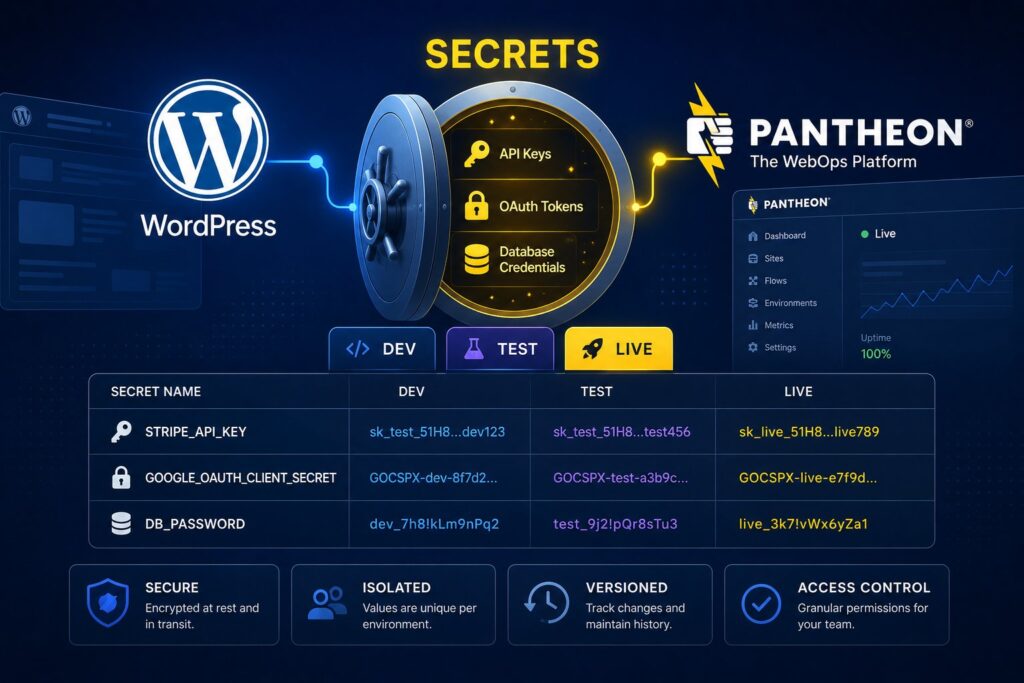
Pantheon Secrets is the credential-management feature that Pantheon-hosted WordPress sites use to store API keys, OAuth tokens, database credentials, encryption keys, and third-party service tokens at the platform layer rather than in wp-config.php, environment variables, or database fields. The architectural advantage is that credentials live separately from code and configuration, with per-environment overrides that let dev, multidev, test, and live use different credentials without configuration drift between environments. The operational advantage is that team members can be granted credential access through Pantheon’s role-based access control rather than through file-level access to wp-config.php or database access. The security advantage is that credentials don’t end up in Git repositories, don’t get accidentally exposed in wp-config.php backups, and don’t require the operational discipline of .env files synced across environments. As of 2026, Pantheon Secrets is the recommended credential storage pattern for Pantheon-hosted WordPress sites and integrates cleanly with the WordPress 7.0 Connectors API’s env-var-first resolution waterfall.
This post covers what Pantheon Secrets actually is, how the per-environment override model works, the access control story, the integration with WordPress 7.0 Connectors API, the practical migration path from wp-config.php-based credential storage, the audit logging, and the operational guidance for teams running production WordPress on Pantheon. For broader context on the WordPress 7.0 Connectors API and the env-var-first secret resolution waterfall, our Securing the WordPress 7.0 Connectors API post covers the platform-side security architecture.
What Pantheon Secrets actually is
Pantheon Secrets is a credential storage service that lives outside the WordPress application stack. Credentials get stored in Pantheon’s secrets infrastructure (not in your application database, not in wp-config.php, not in environment variables in the traditional sense), and your application reads them at runtime through a Pantheon-provided interface.
The architecture pieces:
Secrets storage. Pantheon hosts the actual credential values in an encrypted store managed by Pantheon’s infrastructure. Customers can’t access the storage directly; they interact via Pantheon’s interfaces (Terminus CLI, Pantheon dashboard, or in-application reads).
Per-environment scoping. Each Pantheon environment (dev, test, live, plus any multidev environments) has its own secrets namespace. The same secret name can have different values in different environments. Your application reads from the current environment’s namespace automatically.
Application interface. Pantheon exposes secrets to the WordPress application via the standard PHP getenv() pattern. Your application reads getenv('STRIPE_SECRET_KEY') and Pantheon resolves the value from the appropriate environment’s namespace. The lookup is transparent to the application; the application code doesn’t need to know Pantheon Secrets exists.
Access control. The Terminus CLI and Pantheon dashboard control which team members can read, write, or rotate secrets per environment. Role-based access aligns with Pantheon’s broader access control model.
Audit logging. Pantheon logs secret read and write operations for audit purposes. Compliance use cases that require credential access traceability are supported.
Per-environment override patterns
The per-environment scoping is the operational feature that makes Pantheon Secrets compelling compared to simpler credential storage patterns. The pattern in practice:
Your application uses Stripe for payments. The Stripe integration has different credentials per environment: test API keys for dev and multidev, test API keys for test (so QA testing doesn’t generate real charges), live API keys for live (the production environment).
With Pantheon Secrets, you set the secret STRIPE_SECRET_KEY in the dev environment with the test key value, in the test environment with the test key value, and in the live environment with the live key value. Your application reads getenv('STRIPE_SECRET_KEY') and gets the appropriate value per environment automatically.
Compare this to the pre-Pantheon Secrets pattern (a wp-config.php define statement or a .env file): the credential is in the file, which gets committed to Git (a security problem if the file holds production credentials) or excluded from Git (an operational problem because the file has to be manually synced across environments). The Pantheon Secrets pattern removes both problems.
Other common per-environment credential patterns where this works well:
Database credentials. Different databases per environment. Pantheon Secrets stores the connection details; the application reads them automatically.
OAuth credentials. Different OAuth client IDs and secrets per environment (a development OAuth app, a staging OAuth app, a production OAuth app). Per-environment secrets keep them separate without configuration drift.
Encryption keys. Different encryption keys per environment so that test data encrypted in dev can’t be decrypted in production by accident.
Third-party service tokens. Different SendGrid, Twilio, Slack, Asana, etc. tokens per environment so that test workflows don’t accidentally hit production accounts.
Internal API keys. Different internal-service API keys per environment for sites that integrate with other internal services that themselves have per-environment configurations.
For sites that operate across multiple environments (which is most production Pantheon sites), the per-environment Secrets pattern eliminates a substantial category of configuration drift problems.
Access control
The access control model uses Pantheon’s role-based access control with secrets-specific permissions:
Site admins can read, write, and rotate any secret in any environment.
Site developers can typically read and write secrets in dev and multidev environments, with more limited access to test and live secrets per the team’s policy.
Read-only users can view secret names (for documentation purposes) without seeing values.
The granularity matters because the Pantheon Secrets pattern’s security advantage depends on the access control being meaningful. If everyone with site access can read live secrets, the platform-level storage doesn’t add much over wp-config.php. The fine-grained access control is what makes the security model work.
The practical pattern most teams adopt: developers have full access to dev and multidev secrets, more limited access to test secrets (to support QA workflows), and read-only access to live secrets (so they can verify what’s configured without being able to change values without admin approval). Admins have full access across environments.
Integration with WordPress 7.0 Connectors API
The WordPress 7.0 Connectors API introduced the env-var-first resolution waterfall: when a WordPress connector needs a credential, it tries environment variables first, then PHP constants in wp-config.php, then the WordPress database options table as a last resort. Pantheon Secrets integrates cleanly with this pattern because Pantheon’s secret-resolution mechanism exposes secrets through the environment-variable lookup interface.
In practice: define a connector that needs STRIPE_SECRET_KEY. Store the secret in Pantheon Secrets. The WordPress 7.0 Connectors API checks getenv('STRIPE_SECRET_KEY') first, finds the Pantheon Secret value, and uses it. The connector never touches the database, never reads from wp-config.php, and never exposes the credential to admins browsing the WordPress dashboard.
For new Pantheon-hosted WordPress sites in 2026, this is the recommended credential pattern: Pantheon Secrets for storage, WordPress 7.0 Connectors API for connector-to-credential resolution, no credentials in wp-config.php at all.
For existing sites migrating from wp-config.php-based credential storage, the migration path is straightforward and covered in the next section.
Migrating from wp-config.php
The migration from wp-config.php-based credential storage to Pantheon Secrets:
Step 1: Inventory current credentials. Open wp-config.php and identify every define() statement that holds a credential. Common patterns include STRIPE_SECRET_KEY, MAILGUN_API_KEY, OAUTH_CLIENT_SECRET, database credentials (though Pantheon manages these specifically), third-party service tokens, and internal application secrets.
Step 2: Create the corresponding Pantheon Secrets. Use Terminus or the Pantheon dashboard to create each secret. For each, set the appropriate value in each environment (dev, multidev, test, live). The naming convention can match what was in wp-config.php for minimal application code changes.
Step 3: Update application code to use getenv(). Replace STRIPE_SECRET_KEY references in code with getenv('STRIPE_SECRET_KEY'). For most modern WordPress code, this is a small change.
Step 4: Remove the wp-config.php defines. Once the application is reading from Pantheon Secrets, remove the corresponding define() lines from wp-config.php. Commit the change.
Step 5: Verify per environment. Deploy to dev, verify the application works with secrets resolution. Promote to test, verify. Promote to live, verify. The environment-promotion workflow catches any per-environment configuration issues.
Step 6: Rotate the credentials. The credentials that were in wp-config.php may have been exposed (Git history, backups, etc.). Now is a good moment to rotate them entirely as part of moving to the more secure storage. New credential values, stored in Pantheon Secrets from day one.
The whole migration typically takes a few hours for a small site and a day or two for a larger site with many integrations. The result is meaningfully better security posture and removes a class of credential-leak risks.
Audit logging and compliance
Pantheon logs secret read and write operations for audit purposes. The logs capture which user accessed which secret in which environment at what time. For compliance use cases (SOX, HIPAA, GDPR, internal governance), the audit trail is the artifact that compliance teams use to verify credential access patterns.
The audit logging is automatic; no configuration is needed. The logs are accessible via Pantheon’s dashboard and via API for integration with broader security information and event management (SIEM) systems.
For organizations with stricter compliance requirements, the audit logging combined with the per-environment access control combined with the absence of credentials in code or config files creates a defensible credential management posture that’s substantially stronger than the typical wp-config.php-based pattern.
What teams should do this quarter
Six concrete actions:
- Audit your current credential storage. List every secret in wp-config.php, .env files, or database options. The list is often longer than teams initially estimate.
- Plan the migration to Pantheon Secrets. For new credentials, start in Pantheon Secrets from day one. For existing credentials, schedule the migration.
- Set up per-environment secret values deliberately. The per-environment override is the security advantage; using the same secret value in dev and live wastes the architecture.
- Document your access control policy. Who can read which secrets in which environments? The policy should be explicit and matched against Pantheon’s role-based access control configuration.
- Enable audit log review as a recurring operational pattern. Monthly review of secret access logs catches anomalies before they become incidents.
- Plan credential rotation. Secrets that have lived in wp-config.php for years have potentially been exposed; rotating them as part of the move to Pantheon Secrets is a security upgrade beyond just the storage change.
The deeper takeaway is that credential storage is a security primitive worth getting right, and Pantheon Secrets makes the right pattern accessible to Pantheon-hosted WordPress teams without requiring custom infrastructure. Combined with the WordPress 7.0 Connectors API’s env-var-first resolution, the architecture is clean, the operational pattern is sustainable, and the security posture is substantially better than the historical default of credentials in code or configuration files.
Frequently Asked Questions
What are Pantheon Secrets?
Pantheon Secrets is the credential storage service for Pantheon-hosted WordPress (and Drupal) sites that stores API keys, OAuth tokens, database credentials, encryption keys, and third-party service tokens at the platform layer rather than in wp-config.php, environment variables, or database fields. Credentials are scoped per environment (dev, multidev, test, live), accessible through the standard PHP getenv() interface, and managed through Pantheon’s Terminus CLI and dashboard. Pantheon handles the encrypted storage; customers manage the values via Pantheon’s interfaces.
How is this better than wp-config.php?
Three main improvements. Per-environment overrides eliminate configuration drift between dev, test, and live. Role-based access control lets teams grant specific credential access without granting file-level access to wp-config.php. The absence of credentials in code or config files eliminates a class of credential-leak risks (Git history exposure, backup leakage, accidental admin-dashboard exposure). The audit logging provides credential-access traceability for compliance use cases.
Does this work with the WordPress 7.0 Connectors API?
Yes, cleanly. The WordPress 7.0 Connectors API uses an env-var-first resolution waterfall: it checks environment variables first, then PHP constants in wp-config.php, then the WordPress database as a last resort. Pantheon Secrets exposes secret values through the environment-variable lookup interface, so the Connectors API finds Pantheon Secrets at the top of the waterfall without any special integration code.
How do I migrate from wp-config.php to Pantheon Secrets?
The migration is straightforward. Inventory current credentials in wp-config.php. Create the corresponding Pantheon Secrets via Terminus or the dashboard with appropriate per-environment values. Update application code to use getenv() for the credential lookups (typically a small change). Remove the wp-config.php define statements. Verify per environment. Rotate the credential values as part of the move (since the wp-config.php values may have been exposed historically). The whole migration typically takes a few hours for small sites and a day or two for larger sites.
What access control options exist?
Pantheon’s role-based access control extends to Secrets. Site admins have full access to read, write, and rotate any secret. Developers typically have access to dev and multidev secrets with more limited access to test and live (per team policy). Read-only users can view secret names without values for documentation purposes. The granularity supports the typical pattern of full dev access, limited test access for QA workflows, and read-only live access for verification.
Is there audit logging?
Yes. Pantheon logs secret read and write operations capturing user, secret name, environment, and timestamp. The logs are accessible via dashboard and API for integration with SIEM systems. For compliance use cases requiring credential-access traceability, the audit logging provides the necessary artifacts. The logging is automatic; no configuration needed.
What about secrets that aren’t site-specific?
Pantheon Secrets is currently site-scoped (each Pantheon site has its own secrets namespace, with per-environment sub-namespaces within that). For organization-wide secrets that span multiple sites, the pattern is to manage the secret centrally (via your organization’s existing secret management infrastructure) and propagate to each Pantheon site’s Secrets. For teams operating many Pantheon sites, this can become operationally substantial; the architectural alternative is centralized secret management with Pantheon Secrets as the per-site cache.
What if I’m not on Pantheon?
The Pantheon Secrets feature is Pantheon-specific. Other WordPress hosting providers offer analogous features: WP Engine has its environment variables system, Acquia has the broader Acquia Cloud Site Factory secrets management, and self-hosted WordPress can use platform-agnostic secret managers (HashiCorp Vault, AWS Secrets Manager, Doppler, etc.) integrated via custom plugins or wp-config.php loaders. The architectural pattern (credentials separate from code, per-environment scoping, audit logging) translates across platforms even when the specific implementation differs.