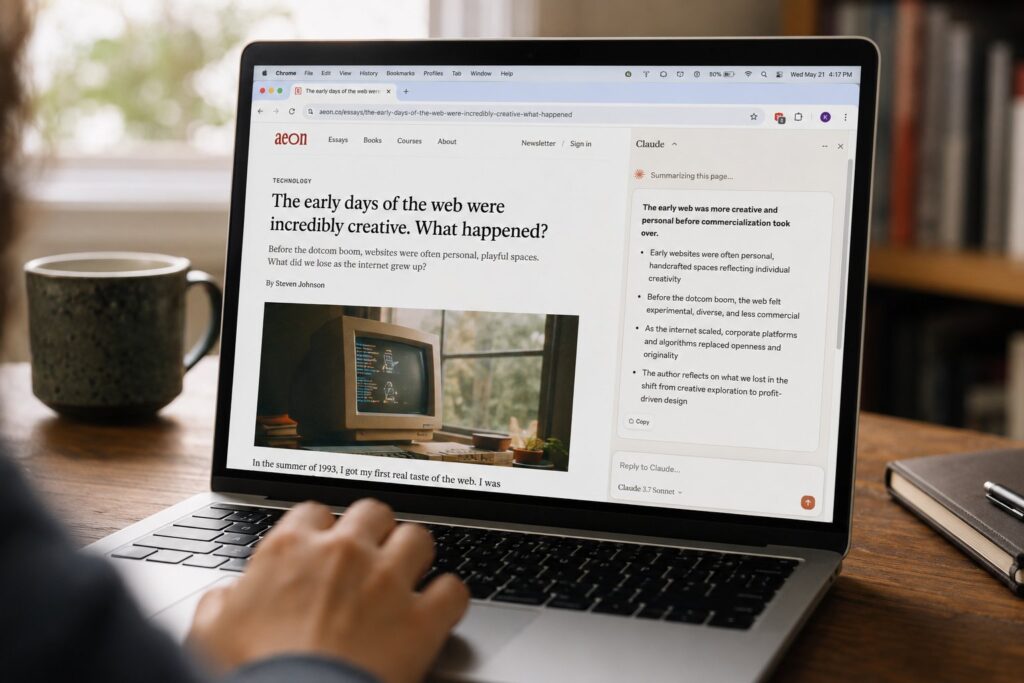
Claude for Chrome is Anthropic’s browser extension that puts Claude in a side panel and lets it act inside your browser: read the page you are on, click buttons, fill forms, move between tabs, and carry a multi-step task to completion. After spending real time with it, the honest summary is this: it is genuinely useful for reading and reasoning over what is on your screen, noticeably shakier when you hand it the mouse and keyboard, and it carries a security caveat serious enough that you should decide deliberately where you let it run. This is a capability review, not a launch recap. Here is what it does well, where it struggles, and what you are actually signing up for.
What Claude for Chrome is, and how it works
The extension installs into Chrome (and Chromium-based Edge) and opens as a side panel next to the page. You type a request in plain language. Depending on what you ask, Claude either answers from the page content it can see or takes over and starts driving the browser: navigating to URLs, clicking elements, typing into fields, and reading the results back before deciding on the next step. It is the same loop that defines every agent, a cycle of observe, decide, act, observe again. If you want the underlying mechanics, we cover them in our practitioner’s guide to AI agents.
The rollout matters for whether you can even try it. Anthropic launched Claude for Chrome as a research preview in August 2025, limited to 1,000 Max plan users. It opened to all Max subscribers on November 24, 2025, then expanded to Pro, Team, and Enterprise plans on December 18, 2025 (Anthropic’s announcement). There is no free tier. The extension is bundled with a paid Claude subscription rather than sold separately.
One practical note before you judge its performance: the model behind the side panel is not fixed. Lighter plans run a faster, cheaper model, while higher tiers let you switch to a stronger one. Anthropic’s flagship line, covered in our Claude Opus 4.8 breakdown, is a different experience in the panel than the fast tier. If your first session felt dim, the model you were assigned is often the reason, not the product.
What it does well
The strongest use of Claude for Chrome is the least agentic one: reading and reasoning over the page in front of you.
- Summarizing and questioning a page: Point it at a long article, a dense documentation page, or a messy comment thread and ask for the gist, the counterarguments, or a specific figure buried in the text. Because it reads the live DOM rather than a scraped copy, it handles content that a paste-into-a-chat-window workflow would mangle.
- Working across a few open tabs: Ask it to compare what three product pages say about pricing, or to pull the shipping policy out of one tab while you read another. Keeping several tabs in context at once is something the side panel does more naturally than copying each page into a separate prompt.
- Structured extraction: “Pull every email address from this directory page into a list” or “turn this table into CSV” is reliable, because the task is bounded and the source is right there on screen.
- Guided form filling with a human watching: For a form you understand and can verify field by field, letting Claude do the typing while you confirm is a real time saver. The keyword is watching.
The common thread is that these tasks are short, verifiable, and low-stakes. You can see the answer, check it against the page, and move on. That is the sweet spot.
Where it struggles
Hand Claude the wheel for a longer autonomous task and the cracks show. This is not unique to Anthropic; it is the current state of the whole category, which we mapped in the 2026 agentic browser landscape. But it is worth being specific about the failure modes.
Long multi-step workflows drift. The more steps a task has, the more chances there are for one wrong click to send the whole run off course. A booking flow or a multi-page checkout that a person does in ninety seconds can become a sequence where Claude misreads a modal, picks the wrong date, or loops on a step it thinks failed. It rarely fails loudly. It fails by quietly doing the wrong thing while looking busy.
Fiddly and non-standard interfaces trip it up. Custom date pickers, drag-and-drop builders, canvas-based editors, and anything that departs from ordinary HTML controls are where clicks land in the wrong place. Sites that lean on hover states, infinite scroll, or heavy JavaScript rendering are harder for it to read accurately.
Confirmation gates slow it down, by design. Anthropic requires you to confirm before sensitive actions like publishing or making a purchase. That is the right call for safety, but it means the "set it and forget it" fantasy does not hold. For anything that touches money or hits publish, you are in the loop whether you wanted to be or not.
It is not faster than you for tasks you already know. For a form you fill in every week, doing it yourself is quicker than writing a prompt, watching the agent, and verifying its work. The payoff shows up on unfamiliar, tedious, or genuinely multi-tab tasks, not on your muscle-memory chores.
The mental model that holds up: Claude for Chrome is a capable assistant that needs supervision, not an employee you can leave alone with your browser.
The security caveat you are actually signing up for
This is the part to read slowly, because it is the real cost of admission.
The core risk is indirect prompt injection. A browser agent reads the page to decide what to do next, and a malicious page can hide instructions in that content: white text, an off-screen element, a crafted comment, an image caption. The agent can read those instructions as if they came from you and act on them. Because the agent already has your logged-in sessions, a successful injection can mean data exfiltration or unwanted actions taken under your identity.
Anthropic has been unusually candid with numbers here. In red-team testing, an autonomous browsing mode without defenses showed a 23.6% attack success rate. With mitigations added, that dropped to 11.2% (Anthropic on browser prompt-injection defenses). Read the second number carefully: roughly one in nine crafted attacks still got through in testing. Lower is better, and the defenses clearly help, but this is not a solved problem, and Anthropic does not claim it is.
The controls Anthropic ships are sensible and worth using:
- Site-level permissions: You grant or revoke Claude’s access per site in settings. Keep the allowlist small and deliberate.
- Action confirmations: Claude asks before high-stakes actions such as publishing or purchasing.
- Blocked high-risk categories: The extension will not operate on certain categories of sites, including financial services, adult content, and pirated content.
- Org-level controls: Team and Enterprise admins can enable or disable the extension org-wide and configure allowlists and blocklists.
Even with those in place, treat the extension as a live surface, not a settled one. In late 2025, security researchers at Koi Security disclosed a chain they named ShadowPrompt, in which an overly permissive origin allowlist combined with a DOM-based cross-site scripting flaw in a hosted CAPTCHA component could let a page inject prompts with no click required (Koi Security’s writeup). Anthropic confirmed the report within a day and patched it within about three weeks, which is a good response. The lesson is not that the product is uniquely unsafe. It is that a browser agent is a large, evolving attack surface, and the defenses are being written in real time.
Who should turn it on
If you already pay for Claude and spend your day reading, comparing, and extracting from web pages, Claude for Chrome earns its place as a reading-and-reasoning copilot. Turn it on, keep it to a supervised role, and lean on it for the summarize-compare-extract work it genuinely accelerates.
If your hope is a hands-off agent that runs long workflows across sensitive accounts while you do something else, temper it. The autonomous side is real but shaky, the confirmation gates keep you in the loop on the actions that matter most, and the prompt-injection risk means the accounts you would most want it to touch are exactly the ones you should keep it away from. That is not a knock on Anthropic specifically. It is the honest state of browser agents in mid-2026, and the sooner you calibrate to it, the more useful the tool becomes.
Frequently asked questions
Is Claude for Chrome free?
No. It is bundled with a paid Claude subscription (Pro, Max, Team, or Enterprise) rather than sold separately, and there is no free-tier access. The capability you get in the side panel depends partly on which model your plan lets you run.
Which browsers does it support?
It installs as an extension in Google Chrome and Chromium-based Microsoft Edge. It is delivered as a browser extension with a side panel, not a standalone browser like some competing products. We compare those approaches in our agentic browser landscape piece.
Can it act without asking me first?
For sensitive actions such as publishing content or making a purchase, no: it requires an explicit confirmation. For lower-stakes navigation and reading, it acts on its own within the sites you have granted access to. You control that access through site-level permissions in settings.
How dangerous is the prompt-injection risk in practice?
It is real and unsolved, but bounded by your habits. Anthropic’s own testing put the attack success rate at 23.6% without defenses and 11.2% with them, so roughly one in nine crafted attacks still succeeded in testing. The practical mitigation is to keep the allowlist small and never run the agent in a browser session logged into your most sensitive accounts.
Is it better than ChatGPT Atlas or Perplexity Comet?
They are different shapes: Claude for Chrome is a side-panel extension inside your existing browser, while Atlas and Comet are standalone browsers. Which fits depends on whether you want an agent layered onto the browser you already use or a separate browser built around one. We lay out the tradeoffs in the 2026 agentic browser landscape.