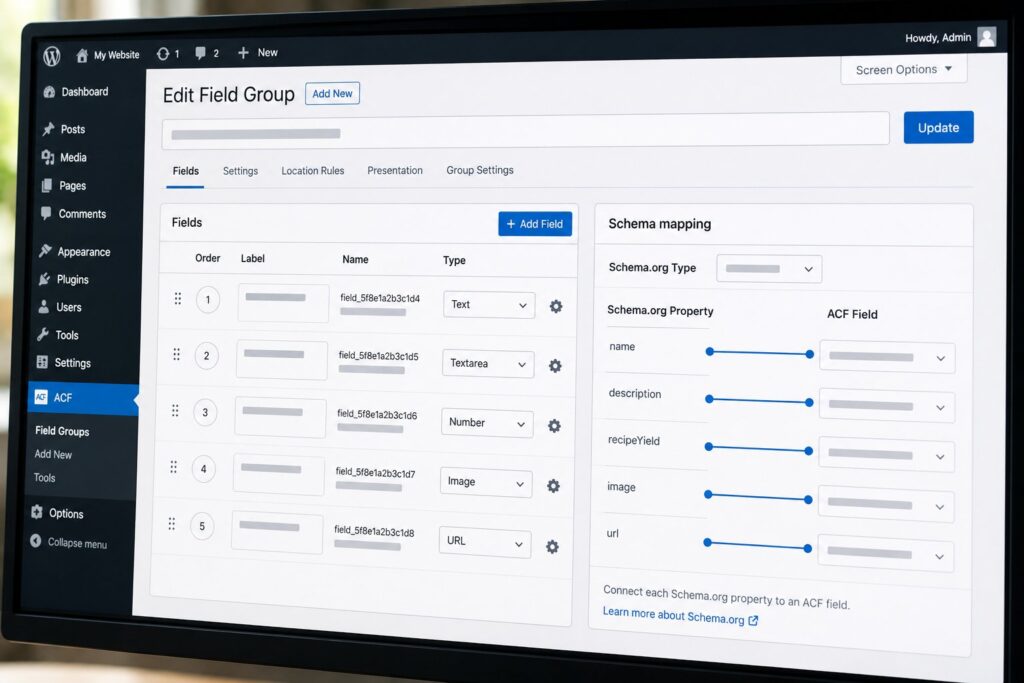
ACF 6.8, released in April 2026, added a Schema.org mapping pane to field groups. The pane lets a developer declare which Schema.org type a field group represents and map individual fields to specific Schema.org properties. ACF then generates the appropriate JSON-LD output on the front end without the developer writing the JSON-LD generation code by hand. The feature is the third major ACF 6.8 addition (alongside the Abilities API integration and the schema-aware field types), and it is the one that most directly addresses the rising importance of structured data for AI-mediated discoverability through search engines and AI Overviews.
This piece walks through four worked examples that cover the most common Schema.org types used by WordPress sites: Recipe, Product, Event, and Article. Each example shows the ACF field group, the Schema.org mapping configuration, the JSON-LD output ACF generates, and the validation pattern. The examples are written so that a developer can follow them step by step and produce equivalent output on their own site. The patterns generalize to other Schema.org types that ACF 6.8 supports, which includes the full Schema.org Core vocabulary as of the 25.0 release.
How the schema mapping pane works
When you create or edit an ACF field group in WordPress 6.7+ with ACF 6.8 installed, a new tab appears in the field group settings called "Schema mapping." Inside this tab you can select a Schema.org type from a searchable dropdown. The dropdown contains every type in the Schema.org Core vocabulary, organized by category (Creative Works, Products, Events, Organizations, People, Places). Selecting a type populates a properties list showing the Schema.org properties defined for that type. Each property has a dropdown letting you bind it to one of the fields in your group, or leave it unbound.
For each binding, you can optionally specify a transformation. The default transformation is identity (the field value is the property value), but you can choose alternatives like "ISO 8601 duration" (for time fields), "ISO 8601 date" (for date fields), "URL" (for URL fields), "structured array" (for nested properties), or "callback" (for custom transformations via a PHP function).
When the page rendering pipeline reaches a post or term that has fields from a mapped group, ACF generates a JSON-LD <script> block in the page head with the appropriate @context, @type, and properties. The JSON-LD is generated server-side as part of the page render and does not require any client-side JavaScript to be present.
The schema mapping pane stores its configuration alongside the field group definition. If you export your field groups as JSON or PHP (the standard ACF deployment pattern), the schema mapping is included in the export. This is the right behavior for treating field groups as code under version control.
Example 1: Recipe
Recipes are the most common Schema.org type used by WordPress sites that publish food content, and they have rich validator support through Google’s Rich Results Test. A working Recipe mapping covers the core required properties (name, recipeIngredient, recipeInstructions) and the optional properties that improve Rich Results display (prepTime, cookTime, recipeYield, image, author).
The ACF field group for a recipe post type might include these fields: recipe_name (text), recipe_image (image), prep_time_minutes (number), cook_time_minutes (number), recipe_yield (text), ingredients (repeater with a single text subfield), instructions (repeater with a single textarea subfield), and author_name (text).
The schema mapping for this field group:
- Schema.org type:
Recipe name→ fieldrecipe_name(identity transformation)image→ fieldrecipe_image(URL transformation)prepTime→ fieldprep_time_minutes(ISO 8601 duration transformation, with minute unit)cookTime→ fieldcook_time_minutes(ISO 8601 duration transformation, with minute unit)recipeYield→ fieldrecipe_yield(identity transformation)recipeIngredient→ fieldingredients(structured array transformation, with the subfield as the array item)recipeInstructions→ fieldinstructions(structured array transformation, wrapped as HowToStep nodes)author→ fieldauthor_name(structured array transformation, wrapped as Person node with name property)
The JSON-LD output ACF generates for a sample recipe:
{
  "@context": "https://schema.org",
  "@type": "Recipe",
  "name": "Chocolate Chip Cookies",
  "image": "https://example.com/wp-content/uploads/cookies.jpg",
  "prepTime": "PT15M",
  "cookTime": "PT12M",
  "recipeYield": "24 cookies",
  "recipeIngredient": [
    "2 cups flour",
    "1 cup butter",
    "1 cup brown sugar",
    "1 cup chocolate chips"
  ],
  "recipeInstructions": [
    { "@type": "HowToStep", "text": "Preheat oven to 375 degrees." },
    { "@type": "HowToStep", "text": "Cream butter and sugar." },
    { "@type": "HowToStep", "text": "Mix in dry ingredients." },
    { "@type": "HowToStep", "text": "Bake for 12 minutes." }
  ],
  "author": {
    "@type": "Person",
    "name": "Jane Smith"
  }
}
This output passes Google’s Rich Results Test for the Recipe rich result type, which is the validator gate for the recipe carousel appearing in Google search and for inclusion in Google’s AI Overviews when a recipe-related query is asked.
A practical extension for production use is to add a nutrition property mapped to a nested field group with calories, fat content, and protein content fields. ACF 6.8 supports nested field group mapping, which is how nutrition information gets emitted as a NutritionInformation node inside the Recipe JSON-LD.
Example 2: Product
Products are the second most common Schema.org type used by WordPress sites and have direct relevance for e-commerce sites that want their products to surface in Google Shopping, comparison-shopping engines, and AI-assisted product queries. The required Product properties for Rich Results are name, image, and either offers or aggregateRating. The optional properties that improve display include brand, sku, review, and description.
The ACF field group for a product might include: product_name (text), product_image (image gallery), description (textarea), brand_name (text), sku (text), price (number), currency_code (select with USD, EUR, GBP options), availability (select with InStock, OutOfStock, PreOrder options), and a reviews repeater with reviewer_name, rating, and review_text subfields.
The schema mapping:
- Schema.org type:
Product name→ fieldproduct_nameimage→ fieldproduct_image(URL transformation; ACF emits the first image as the primary)description→ fielddescriptionbrand→ fieldbrand_name(structured array transformation, wrapped as Brand node)sku→ fieldskuoffers→ composite mapping withpricefrom fieldprice,priceCurrencyfrom fieldcurrency_code,availabilityfrom fieldavailability(wrapped as Offer node with schema.org URL prefix on availability values)review→ fieldreviews(structured array transformation, wrapped as Review nodes with Person authors)aggregateRating→ calculated fromreviews(averaging the rating subfield; this uses the "callback" transformation with a built-in helper)
The JSON-LD output for a sample product:
{
  "@context": "https://schema.org",
  "@type": "Product",
  "name": "Premium Coffee Beans",
  "image": "https://example.com/wp-content/uploads/coffee.jpg",
  "description": "Single-origin Ethiopian coffee beans.",
  "brand": {
    "@type": "Brand",
    "name": "DM Roasters"
  },
  "sku": "DM-COF-001",
  "offers": {
    "@type": "Offer",
    "price": "24.99",
    "priceCurrency": "USD",
    "availability": "https://schema.org/InStock"
  },
  "review": [
    {
      "@type": "Review",
      "author": { "@type": "Person", "name": "Alice" },
      "reviewRating": { "@type": "Rating", "ratingValue": "5" },
      "reviewBody": "Excellent coffee, smooth finish."
    }
  ],
  "aggregateRating": {
    "@type": "AggregateRating",
    "ratingValue": "5",
    "reviewCount": "1"
  }
}
This output is validator-clean for the Product rich result type. A production site would typically extend the field group with shipping details (mapped to a shippingDetails Offer subproperty) and return policy (mapped to hasMerchantReturnPolicy). ACF 6.8 supports both extensions through the same mapping pattern.
Example 3: Event
Events are the Schema.org type most relevant for sites that publish event listings (conferences, meetups, performances, classes). The required Event properties for Rich Results are name, startDate, and location. The optional properties that improve display include description, image, endDate, offers, organizer, and performer.
The ACF field group for an event might include: event_name (text), event_image (image), description (textarea), start_datetime (date time picker), end_datetime (date time picker), venue_name (text), venue_address (text), venue_city (text), venue_country (text), organizer_name (text), organizer_url (url), ticket_price (number), ticket_currency (select), ticket_url (url), and event_status (select with Scheduled, Canceled, Postponed, Rescheduled).
The schema mapping:
- Schema.org type:
Event name→ fieldevent_nameimage→ fieldevent_image(URL transformation)description→ fielddescriptionstartDate→ fieldstart_datetime(ISO 8601 date transformation)endDate→ fieldend_datetime(ISO 8601 date transformation)eventStatus→ fieldevent_status(URL prefix transformation with schema.org base)location→ composite mapping withnamefrom fieldvenue_name,addressfrom fieldsvenue_address,venue_city,venue_country(wrapped as Place node with PostalAddress subnode)organizer→ composite mapping withnamefrom fieldorganizer_name,urlfrom fieldorganizer_url(wrapped as Organization node)offers→ composite mapping withpricefrom fieldticket_price,priceCurrencyfrom fieldticket_currency,urlfrom fieldticket_url(wrapped as Offer node)
The JSON-LD output for a sample event:
{
  "@context": "https://schema.org",
  "@type": "Event",
  "name": "WordPress Phoenix Meetup",
  "image": "https://example.com/wp-content/uploads/meetup.jpg",
  "description": "Monthly meetup for WordPress developers in Phoenix.",
  "startDate": "2026-07-15T18:30:00-07:00",
  "endDate": "2026-07-15T20:30:00-07:00",
  "eventStatus": "https://schema.org/EventScheduled",
  "location": {
    "@type": "Place",
    "name": "The Wing Phoenix",
    "address": {
      "@type": "PostalAddress",
      "streetAddress": "3110 N Central Ave",
      "addressLocality": "Phoenix",
      "addressCountry": "US"
    }
  },
  "organizer": {
    "@type": "Organization",
    "name": "WordPress Phoenix",
    "url": "https://wpphoenix.example.com/"
  },
  "offers": {
    "@type": "Offer",
    "price": "0",
    "priceCurrency": "USD",
    "url": "https://example.com/event/wp-phoenix-meetup"
  }
}
This output passes the Rich Results Test for the Event rich result type. A production site would typically extend the field group to support recurring events (a repeater of startDate and endDate pairs mapped to multiple Event nodes), online-only events (replacing the location Place with a VirtualLocation node), and event series (linking the event to a parent EventSeries node via a superEvent property).
Example 4: Article
Articles are the Schema.org type that most blog posts and editorial content use. The required Article properties for Rich Results are headline, image, datePublished, and author. The optional properties that improve display include description, dateModified, publisher, and articleBody.
For Article mapping the ACF pattern is slightly different from the previous three examples because Article information is already largely captured in WordPress’s native post fields (the title, the featured image, the publish date, the author, the post content). The ACF mapping in this case is typically used as a layer that augments the native data with additional fields rather than replacing it.
The ACF field group for article augmentation might include: article_subtitle (text), article_category_tag (text), article_word_count (number), and an image_credit (text) field for credit information. The schema mapping draws on both native WordPress fields and ACF fields, which ACF 6.8 supports through the "native field" binding option.
The schema mapping:
- Schema.org type:
Article headline→ native fieldpost_titleimage→ native field_thumbnail_id(URL transformation, resolving the attachment ID to its URL)datePublished→ native fieldpost_date(ISO 8601 date transformation)dateModified→ native fieldpost_modified(ISO 8601 date transformation)author→ native fieldpost_author(resolving the user ID to a Person node with name and URL from user profile)articleBody→ native fieldpost_content(with HTML stripping)description→ fieldarticle_subtitle(or fallback topost_excerpt)wordCount→ fieldarticle_word_count(or calculated frompost_content)publisher→ composite from site settings (the publisher Organization node is configured once at the site level and referenced from every Article mapping)
The JSON-LD output for a sample article:
{
  "@context": "https://schema.org",
  "@type": "Article",
  "headline": "ACF 6.8 Schema.org Mapping: Recipe, Product, Event, and Article Worked Examples",
  "image": "https://example.com/wp-content/uploads/acf-schema.jpg",
  "datePublished": "2026-06-30T14:00:00-07:00",
  "dateModified": "2026-06-30T14:00:00-07:00",
  "author": {
    "@type": "Person",
    "name": "Digital Matters Editorial",
    "url": "https://digitalmatters.me/about"
  },
  "publisher": {
    "@type": "Organization",
    "name": "Digital Matters",
    "logo": {
      "@type": "ImageObject",
      "url": "https://digitalmatters.me/logo.png"
    }
  },
  "description": "Four hands-on ACF 6.8 examples: mapping Recipe, Product, Event, and Article field groups to Schema.org JSON-LD output."
}
A common production pattern for Article mapping is to use the schema mapping pane to set up the binding once and rely on it for every post in the post type. The publisher Organization node is configured at the site level rather than per post, which is the right place for it.
Validation patterns
Once the schema mappings are in place, validation should happen at two levels.
The first level is the development-time check using Google’s Rich Results Test. Paste a URL or HTML snippet into the test interface at search.google.com/test/rich-results and the test returns a summary of detected structured data and any errors or warnings. The test is the authoritative validator for whether Google’s parsers accept the structured data. A clean Rich Results Test result is the gate for the structured data appearing as a rich result in Google search.
The second level is the validator-agnostic check using the Schema Markup Validator at validator.schema.org. This validator checks structured data against the Schema.org specification rather than against Google’s specific Rich Results requirements. A check here catches errors that would prevent the data from being valid Schema.org even if Google’s parsers happen to accept it. Run this check second after the Rich Results Test to confirm broader correctness.
For production sites it is worth scripting both checks in CI. The Rich Results Test has a free API tier that supports a few hundred URL checks per day. The Schema Markup Validator does not have a stable public API but can be invoked from the CLI through community tools. Both can be wrapped in a CI step that runs against a representative sample of pages on each deploy.
A third validation layer that has become valuable in 2026 is the AI Overview citation check. After the structured data is in place and Google has had a few weeks to re-crawl, run queries that should plausibly produce AI Overviews citing the structured data and check whether the AI Overview cites the page. The check is not deterministic (AI Overviews vary on the same query) but consistent presence in the citations is evidence that the structured data is improving discoverability through the AI surface as well as the traditional rich results surface.
What ACF 6.8 mapping does not solve
The schema mapping pane handles the common cases for type binding and JSON-LD generation. It does not solve every Schema.org need. The first unsolved area is dynamic Schema.org reasoning where the appropriate Schema.org type depends on runtime data. A field group bound to "Product" emits Product JSON-LD for every post; a field group that should sometimes be Product, sometimes Book, sometimes SoftwareApplication based on a field value requires custom code rather than mapping configuration.
The second is Schema.org properties that the mapping pane does not yet expose. The full Schema.org Core vocabulary is supported, but some of the more specialized Schema.org extensions (the Bib extension for bibliographic data, the Auto extension for vehicle listings) are not yet first-class in the mapping pane. Sites that need these extensions still benefit from ACF 6.8’s JSON-LD generation infrastructure but must specify the mapping in PHP rather than through the UI.
The third is structured data validation at the time the field is entered. The mapping pane validates that the field-to-property binding is type-compatible (you cannot map a date field to a property that expects a number), but it does not validate that the user’s entered data is meaningful for the property. A recipeYield field can legitimately be "24 cookies" or "1 cake," and the mapping pane does not impose a particular format. This is the right tradeoff for flexibility but means that data quality remains a content-editor responsibility.
Frequently asked questions
Does ACF 6.8 schema mapping work alongside Yoast SEO’s schema output?
Yes, but the two should be coordinated. Yoast emits its own JSON-LD blocks. ACF emits separate JSON-LD blocks. If both are emitting the same type for the same content, Google sees two competing JSON-LD blocks and may pick one arbitrarily. The recommended pattern is to disable Yoast’s JSON-LD output for the post types that ACF is handling and let ACF be the single source of structured data.
Can I use the mapping pane on existing field groups?
Yes. The schema mapping tab appears on every field group after ACF 6.8 is installed. Existing field groups can be augmented with a schema mapping without changing any field definitions.
Does the JSON-LD output include language information?
Yes. The output includes the `inLanguage` property derived from the post’s language metadata. Multilingual sites with WPML or Polylang have their language correctly emitted in the JSON-LD.
Does ACF 6.8 emit Microdata in addition to JSON-LD?
No. JSON-LD is the only output format. Microdata and RDFa are not generated. JSON-LD is Google’s preferred format and is what the Rich Results Test validates, so the single-format design is the right tradeoff.
Can I disable the schema output per post?
Yes. A `_acf_schema_disabled` post meta field, if set to a truthy value, suppresses schema output for the specific post. This is the escape hatch for posts that should not emit structured data despite belonging to a mapped post type.
Does the schema output affect site performance?
The JSON-LD generation happens server-side during page render and adds a small amount of CPU time per page. For a typical post with one or two mapped field groups, the additional time is in the low milliseconds. The output is cacheable as part of the page HTML.
Does the mapping pane support custom Schema.org types?
Yes. The mapping pane includes an “advanced” mode that lets you specify a Schema.org type by URL rather than choosing from the dropdown. Properties are not auto-populated for custom types, so the property mapping has to be entered manually, but the JSON-LD generation works the same way.
How does the mapping pane handle missing field values?
If a field bound to a Schema.org property is empty, ACF omits the property from the JSON-LD output rather than emitting an empty value. This is the right behavior for type validation: the resulting JSON-LD is always a valid subset rather than a sometimes-incomplete superset.