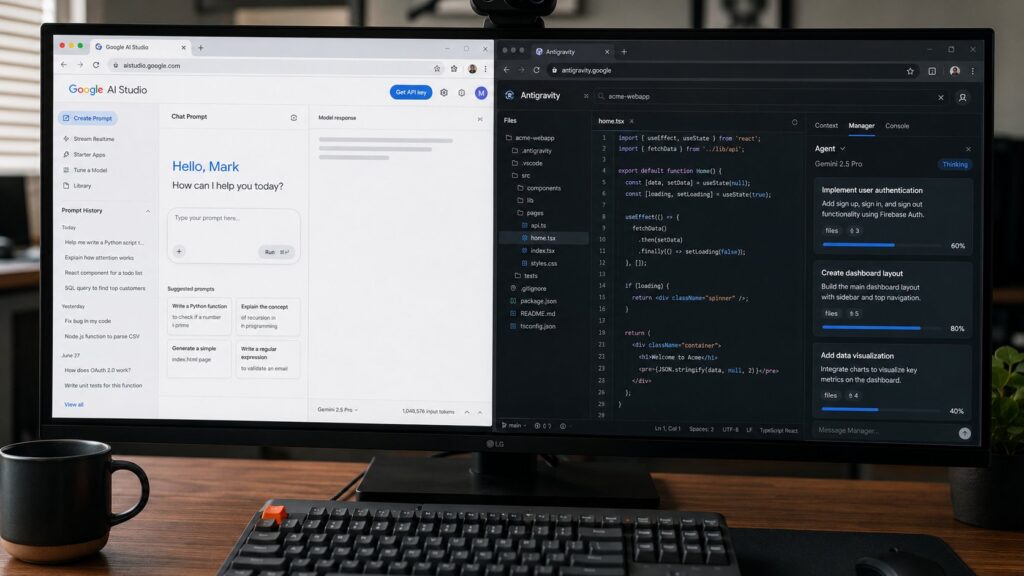
Google ships two distinct developer-facing AI products that overlap in surface but differ in purpose. AI Studio is the rapid-prototyping and API-exploration surface, designed for vibe-coding sessions, model evaluation, and quick app builds. Antigravity is the agentic IDE, designed for sustained development work with parallel-coding-agent capabilities and integration with Google Cloud production deployment. Both use Gemini 3 Pro as their primary model. Both let developers build and ship AI-backed applications. The choice between them is a recurring question for teams who have started using one and wonder whether they should switch, and for teams new to Google’s AI stack who are trying to figure out the right starting point.
This piece walks through the working distinction between the two products, the decision criteria that determine when each is the right tool, the handoff patterns that have emerged for teams that use both, and the cost and capability considerations that should inform the choice. Both products have foundational pillars on Digital Matters (the AI Studio pillar from June 1, 2026 and the Antigravity pillar from May 6, 2026) that cover what each product is. This piece is the decision post that the two foundationals enable.
The intentional design distinction
Google has been explicit in its product documentation that AI Studio and Antigravity occupy different positions in the developer lifecycle. AI Studio is positioned as the "first hour" surface. The user opens AI Studio in a browser, picks a model, writes a prompt, sees results, refines, exports the code, and either keeps iterating or moves to a different tool for sustained development. The "vibe coding" mode that AI Studio introduced in early 2025 is the most prominent expression of this positioning: a session that goes from idea to working prototype in minutes, with the prototype hosted at a temporary URL for sharing.
Antigravity is positioned as the "sustained work" surface. The user opens Antigravity as their primary development environment, works on a codebase across many sessions, runs multiple parallel coding agents through the Manager view, debugs and tests within the IDE, and deploys to production through integrated Google Cloud pathways. Antigravity is not designed for quick prototyping (the IDE has overhead that is wasted on a one-shot session) and AI Studio is not designed for sustained work (the web surface lacks the depth of an IDE).
The distinction maps closely to the historical distinction between Replit or Glitch on the prototyping side and VS Code or JetBrains on the sustained-development side, with the difference that both AI Studio and Antigravity are Google-vertical products that share data and model access through the Google AI Platform. The shared data and model access is the architectural integration story that makes the handoff between them workable.
Decision criteria
The recurring decision question is: I have an idea for an AI-backed app. Where should I start? The answer depends on three considerations.
The first consideration is timeline and scope. If the goal is a one-hour prototype to see whether an idea works, AI Studio is the right starting point. If the goal is a project that will be worked on over weeks or months, Antigravity is the right starting point. The friction of setting up Antigravity is justified for sustained work but not for quick exploration. The friction of leaving AI Studio when work outgrows it is justified by the speed of the initial prototyping but compounds for sustained development.
The second consideration is what the user is optimizing for. AI Studio optimizes for time-to-first-result. Antigravity optimizes for sustained productivity over many sessions. Teams who care about how fast they can validate an idea start with AI Studio. Teams who care about how productive they can be on their primary codebase start with Antigravity.
The third consideration is the deployment target. AI Studio’s hosted-preview pathway is excellent for sharing prototypes but is not a production deployment surface. The exported code from an AI Studio session needs to be deployed somewhere else for production. Antigravity’s Google Cloud integration pathway is a production deployment surface: a project in Antigravity can be deployed to Cloud Run, App Engine, GKE, or Vertex AI without leaving the IDE. Teams whose deployment target is Google Cloud should weigh this integration.
A useful heuristic that has emerged: AI Studio for the first hour of an idea, Antigravity for everything after the first hour if the idea is going to be worked on for more than a day. The boundary between "this is just exploration" and "this is going to be a project" is the moment when most teams move from AI Studio to Antigravity in practice. The signal is when the developer notices that they are reopening the AI Studio session for a third or fourth time and want IDE features (version control, multi-file editing, debugging) that AI Studio does not provide.
Capability comparison
Both products use Gemini 3 Pro as the primary model and have access to the same set of Gemini models for model-selection workflows. The capability differences are not in the models themselves but in what each product builds on top of the models.
AI Studio’s capability surface is centered on rapid iteration. The notable surfaces are: the prompt-engineering workbench (a Notebook-style interface for testing prompts against models), the model comparison view (side-by-side outputs from different Gemini models on the same prompt), the structured output tester (JSON schema validation against the model’s output), the vibe-coding mode (the natural-language-to-app workflow that produces a deployable web app in one session), and the integrated billing dashboard that shows token consumption in real time.
Antigravity’s capability surface is centered on sustained development. The notable surfaces are: the Manager view (orchestration interface for parallel coding agents), the Artifacts panel (verifiable output from agents in structured form), the IDE features (file tree, multi-file editing, debugger, test runner, terminal), the Git integration (commit, branch, PR workflow inside the IDE), the Google Cloud deployment pathways (one-click deployment to multiple Google Cloud targets), and the SDK and Managed Agents surfaces (for calling agentic workflows from external code).
The overlap is meaningful but not complete. Both products can be used to write code that calls Gemini models. Both products can deploy a simple web app to a hosted preview. Both products have integrated access to the Google AI Platform’s model catalog. The non-overlap is where each product has invested most heavily: AI Studio in the iteration speed and prompt-engineering workflows, Antigravity in the IDE depth and agent-orchestration surfaces.
The handoff pattern
Teams that use both products have settled on a consistent handoff pattern. The handoff goes from AI Studio to Antigravity when the work transitions from exploration to sustained development. The mechanics of the handoff are straightforward in practice. AI Studio’s export-to-code feature produces a Git repository with the project’s full code, configuration, and dependency manifest. The repository can be imported into Antigravity as a starting point for sustained development. The model selections and prompt patterns from the AI Studio session carry over because both products share the same Google AI Platform backend.
The handoff is not symmetric. The Antigravity-to-AI-Studio direction is rarely used because AI Studio’s surface is too lightweight to be useful for code that has matured past the prototype stage. The one-direction handoff is the expected workflow, and Google has invested in making the export-to-Antigravity path frictionless. Teams that have made the handoff describe it as low-friction, with the main work being the conversion of any AI Studio session state (saved prompts, model configurations) into Antigravity’s project structure.
A second handoff pattern is "AI Studio for prompt iteration, Antigravity for production." A team can keep using AI Studio for the prompt-engineering work (where the model comparison view and the structured output tester are most useful) while doing the production work in Antigravity. The prompts developed in AI Studio are deployed into the Antigravity-based application through the shared Google AI Platform backend. This split usage is more common among teams whose work has substantial prompt-engineering content.
A third pattern, less common but worth mentioning, is "Antigravity for code, AI Studio for evaluation." A team can develop the application in Antigravity and use AI Studio’s evaluation surfaces (model comparison, structured output tester) to assess model performance against a held-out set. The evaluation work in AI Studio happens in parallel with the development work in Antigravity. This pattern is useful for teams whose model selection is a meaningful engineering decision that needs structured evaluation support.
Cost considerations
The pricing models for the two products are different and the difference can be meaningful.
AI Studio is free for the prototyping surfaces (model access, vibe coding, prompt workbench) with a generous monthly quota of free Gemini tokens. The hosted-preview deployments are also free during the preview window (typically 14 days from creation). Production deployments from AI Studio require moving to a paid tier or to a different deployment surface entirely. The effective free tier is large enough that individual developers and small teams can do substantial prototyping work without paying.
Antigravity has tiered pricing. The free tier includes basic IDE features and limited agent capacity (typically two concurrent agents). The Pro tier (currently around $20 per month per user as of mid-2026) includes unlimited concurrent agents, the Manager view, Artifacts, and full Google Cloud integration. The Enterprise tier (with custom pricing) adds SSO, audit logs, admin controls, and dedicated support. Gemini API tokens consumed by Antigravity agents are billed separately and charged at the standard Google AI Platform rates.
For a team’s total cost, the right comparison is "AI Studio’s free tier plus a separate IDE plus separate Google Cloud deployment" versus "Antigravity Pro plus Gemini tokens." For most teams doing sustained work, Antigravity Pro is cost-competitive with the alternative because the IDE features and the Google Cloud integration are bundled. For teams doing exploratory work, AI Studio’s free tier is meaningfully cheaper because most of the work happens within the free quota.
A consideration that has shifted in 2026 is that the Antigravity Manager view enables work that consumes substantially more Gemini tokens than a serial development workflow. A team using Antigravity at full capacity will see Gemini token bills that are larger than the team’s IDE subscription. Budgeting for the model token costs as a separate line item rather than as an IDE overhead is the right pattern.
Operational considerations
Beyond capability and cost, several operational considerations affect the decision.
The first is collaboration model. AI Studio’s collaboration is shareable preview links: a user can share a hosted preview with a teammate or stakeholder, who can view the running app but cannot edit the source. Antigravity’s collaboration is repository-based: multiple team members work on a shared codebase through standard Git workflows. For solo work or for sharing demos, AI Studio’s model is simpler. For team development, Antigravity’s model is the right fit.
The second is observability and debugging. AI Studio’s debugging surface is the standard browser developer tools applied to the hosted preview. Antigravity has integrated debugging, logging, profiling, and trace inspection across both the application code and the agent execution. For sustained development on non-trivial applications, Antigravity’s observability is meaningfully better.
The third is the question of vendor lock-in. Both products are Google-specific. Code developed in either can be exported and run elsewhere, but the integration with the Google AI Platform (model access patterns, IAM-based authentication, Cloud-resident data) is deepest when the code stays in the Google ecosystem. Teams that are committed to Google Cloud will find the integration valuable. Teams that are multi-cloud or that may move providers should plan for the export work that a future migration would require.
The fourth is the question of update cadence. AI Studio releases features approximately monthly with relatively minor changes per release. Antigravity has had more significant feature releases (the Manager view in February 2026, the SDK and Managed Agents in May 2026) with the trade-off that the surface has evolved more dramatically. Teams that prefer stability should be aware that Antigravity is the more actively evolving product.
Which to start with for a new team
For a team that is new to Google’s AI stack and starting from scratch, the recommendation depends on the team’s primary work. A team whose work is mostly prototyping and model evaluation should start with AI Studio. A team whose work is mostly application development with AI capabilities should start with Antigravity. A team whose work is split should use both, with the handoff pattern described above.
A common confusion in 2026 is that some teams default to AI Studio because it is the more publicly visible product and end up doing sustained work in it past the point where Antigravity would be more appropriate. The symptoms of being too long in AI Studio include the team using browser tabs as session state, hand-managing the export-to-code workflow for changes, and lacking version control on the work. Teams that recognize these symptoms should make the AI Studio to Antigravity handoff sooner rather than later.
A second common confusion is that some teams default to Antigravity for exploratory work because it is the more powerful product, and they spend more time setting up the IDE than they spend exploring the idea. The symptoms include the team’s first three days being IDE configuration and integration work rather than seeing whether the idea has legs. Teams that recognize these symptoms should make a quick AI Studio session the first step before opening Antigravity.
What is changing
Both products are evolving. AI Studio has announced an expanded build mode that produces full-stack apps with backends rather than only frontend prototypes (rolled out incrementally through Q3 2026), expanded Android app generation (in preview), and a "ship to Cloud Run" deployment path that bridges the AI-Studio-to-production gap that has historically forced teams off AI Studio.
Antigravity has announced expanded SDK and Managed Agents capabilities (giving the Manager view’s orchestration to external code), a "Six months of Antigravity" v2.0 release expected in September 2026, and deeper integration with the Gemini Enterprise Agent Platform for agent governance at the organizational level.
The trajectory of both products points at less overlap rather than more. AI Studio is moving toward "prototyping to production for relatively simple apps" while Antigravity is moving toward "agentic IDE for serious application development with enterprise governance." The decision criteria in this piece are likely to remain stable, with the boundary between the two products shifting slightly toward AI Studio’s broader applicability for simpler production cases.
Frequently asked questions
Can I use AI Studio and Antigravity together on the same project?
Yes. The handoff patterns described above describe how teams use both. The shared Google AI Platform backend means model access and authentication carry across both products.
Are AI Studio and Antigravity available outside the United States?
Yes, both are available globally with the same set of regional restrictions that apply to Gemini API access. Some advanced features (the Manager view, certain Vertex AI integrations) have additional regional rollout schedules.
Does the same Google account work in both?
Yes. AI Studio and Antigravity authenticate against the same Google account, share the same Google AI Platform billing relationship, and surface the same project structure.
Which has better support for Python vs JavaScript vs other languages?
Both support multiple languages, with the strongest first-party support for Python and JavaScript. Antigravity’s IDE features are language-agnostic and support whatever LSPs are installed. AI Studio’s code generation defaults to the dominant language for the requested app type (web apps default to JavaScript with React, backend apps default to Python with FastAPI).
Can I run a local model in either?
Both support Gemini models hosted by Google. Neither has first-party support for local model inference. Antigravity can be configured to call a local Ollama instance through the standard HTTP API, which gives a local-model workflow inside the IDE but does not change the agent orchestration features (which depend on Gemini’s specific capabilities).
Is the vibe-coding mode in AI Studio available in Antigravity?
Antigravity has its own equivalent, the “Spec-to-Code” workflow, which serves a similar purpose but is integrated with the IDE rather than the web surface. Vibe coding in AI Studio and Spec-to-Code in Antigravity overlap conceptually but differ in details.
What happens to my AI Studio session if I leave it open for a long time?
AI Studio sessions persist as long as the project is saved. The hosted preview URL has a 14-day default lifetime, after which the preview is taken down. The underlying project remains accessible and can be re-deployed to a fresh preview at any time.
Can I export an Antigravity project to AI Studio?
The export direction is technically possible (Antigravity projects are standard codebases), but the AI Studio surface lacks the IDE features that the Antigravity project depends on. The export to AI Studio is rarely useful in practice; the typical direction is AI Studio to Antigravity.