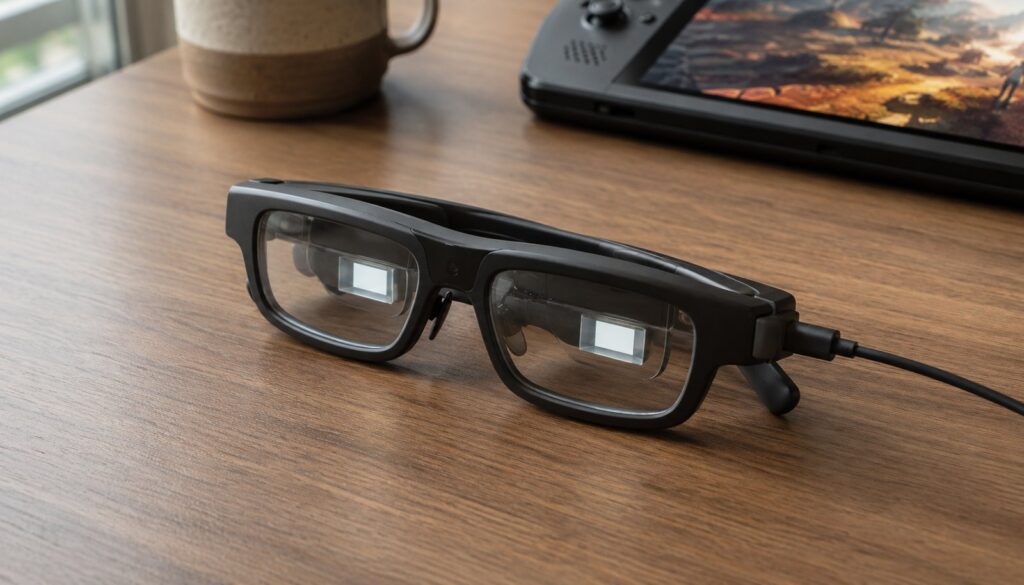
AR glasses are wearable displays that float a large, private screen in front of your eyes while you still see the room around you. Slip on a pair like the VITURE Beast, plug them into a phone or laptop, and you get the equivalent of a 174-inch screen a few feet away, for $549 and about the weight of a chunky pair of sunglasses. No headset, no controllers, no closed-off virtual world. If you have heard the terms AR glasses, XR glasses, or smart glasses used interchangeably and come away confused, this guide sorts out what these devices actually are, how they work, and what they are good for.
This is the entry point. We go deeper on specific models in follow-up pieces; here the goal is to give someone who knows nothing about the category a clear, accurate mental model before spending any money.
What AR glasses actually are
Start with the honest version, because the marketing blurs it. Most of what gets sold today as "AR glasses" are more precisely display glasses, sometimes called XR glasses. Inside each lens sits a tiny, very bright micro-display. Optics bounce that image into your eyes so it appears as a big screen hovering in space. You are not seeing digital objects anchored to your real desk. You are seeing a floating monitor that moves with your head, layered over your normal vision.
That is different from two neighboring categories that share the "glasses" label:
- True augmented reality: digital content locked to the physical world, so a virtual object stays put on your table as you walk around it. This needs far more sensors and processing, and remains rare and expensive.
- Camera-first smart glasses: products like Ray-Ban Meta that add a camera, speakers, and an AI assistant but have no real display. They are about capture and audio, not a screen.
The display glasses we are focused on sit between a phone screen and a VR headset: bigger and more private than the former, lighter and more open than the latter. When people say they want "AI-augmented reality glasses" for watching, gaming, or working on the go, this is almost always the category they mean.
How AR glasses work
Nearly every pair on the market follows the same recipe, so understanding one helps you read every spec sheet. Using the VITURE Beast as a concrete example (its full specs are on VITURE’s product page):
- Micro-OLED panels: one tiny, dense display per eye. The Beast uses dual Sony micro-OLED panels at up to 1200p per eye, which is what “4K-like” marketing refers to across both eyes.
- A virtual screen size and field of view: the Beast projects a 174-inch image with a 58-degree field of view. Field of view, measured in degrees, is the honest number to watch. It tells you how much of your vision the screen fills.
- Brightness in nits: brighter screens stay readable in daylight. The Beast peaks around 1,250 nits, which is high for the category.
- A USB-C tether: a single cable carries video from a compatible phone, laptop, handheld, or console using DisplayPort over USB-C. The glasses draw power from that device, so there is no battery to charge.
- Head tracking: basic 3DoF tracking lets the screen stay anchored in place or follow your head. More on the 3DoF versus 6DoF distinction below.
- Electrochromic dimming: the lenses can darken to make the image pop or lighten to let the room back in. The Beast offers nine levels.
The same dedicated, purpose-built silicon trend we see in specialized on-device hardware shows up here too: the heavy lifting happens in small, efficient chips rather than a bulky computer strapped to your face.
What you would actually use them for
Four use cases drive most purchases:
- Big-screen media and travel: a private cinema on a plane or couch, without disturbing anyone or hauling a monitor.
- Gaming: plug into a Steam Deck, ROG Ally, console, or cloud-gaming phone for a large, low-latency screen.
- Portable productivity: a giant or multi-window workspace anywhere, useful for focused work in cramped spaces. This is the angle most relevant to the readers who follow our IT hardware coverage.
- Privacy: nobody beside you can read your screen, which matters on transit or in shared spaces.
A growing set of AI-driven features is starting to appear too, such as real-time conversion of flat video into stereoscopic 3D. These are early and inconsistent today, but they hint at where the category is heading.
The current landscape
The space is small but competitive, and the VITURE Beast is a useful anchor because it currently sits at the high end on the two specs that matter most for immersion: field of view and brightness. Its main rivals tell you the range. The Xreal One Pro runs about $649 with a slightly narrower field of view and lower brightness, while the RayNeo Air 4 Pro comes in cheaper, near $299, with a smaller screen. Reviewers broadly rate the Beast among the best display glasses you can buy right now (coverage at Road to VR walks through the comparison).
Keep that decoder point in mind: these display glasses are a different product from camera-first smart glasses. Both wear the "glasses" label, but one gives you a screen and the other gives you a camera and a voice assistant.
What to look for before you buy AR glasses
When you compare models, weigh these in roughly this order:
- Field of view: the single best proxy for immersion. Bigger degrees mean a more enveloping screen.
- Brightness: higher nits stay usable in more environments.
- Resolution per eye: sharper text and detail, which matters most for productivity.
- 3DoF versus 6DoF: 3DoF tracks where you look; 6DoF also tracks where you move. Most display glasses, including the Beast, are 3DoF, which is fine for a fixed virtual screen.
- Tethered versus standalone: nearly all are tethered to a host device by USB-C. Check that your phone, laptop, or console actually supports video over its USB-C port.
- Comfort and vision: weight, fit, and whether the glasses support your prescription. The Beast ships with a prescription lens frame rather than built-in focus dials, and suggests sessions of about three to four hours.
The honest limits
These are not magic, and a beginner should know the catches before buying. Display glasses are tethered, so they need a compatible device and a cable; there is no standalone mode. They are 3DoF, so they anchor a screen well but do not map a room. Software is still maturing, and some headline features arrive through firmware updates after launch rather than on day one. Comfort varies by face and tolerance, which is why wear-time guidance tops out around a few hours. And while color is vivid, the most color-critical creative work is still better on a calibrated monitor. None of that disqualifies the category. It just sets honest expectations, the same way evaluating any device against the real workload does across the wider field of AI-era technology.
Frequently asked questions
Are AR glasses the same as VR headsets?
No. VR headsets are opaque and replace your view with a fully virtual world, usually with motion controllers and onboard computing. AR glasses (display glasses) are see-through, lightweight, and project a screen over your normal vision while you stay aware of your surroundings. They are closer to a wearable monitor than to a VR headset.
Do AR glasses need a phone or PC?
Almost always, yes. Most display glasses are tethered by USB-C to a host device that supplies both video and power, such as a phone, laptop, handheld, or console. Before buying, confirm your device outputs video over its USB-C port, because not all of them do.
Can you use AR glasses as a monitor for work?
Yes, and it is one of the main reasons people buy them. They can show a single large virtual screen or multiple windows, which is useful for focused work in tight spaces like a plane seat. Text sharpness depends on the per-eye resolution, so check that spec if productivity is your priority.
What is the difference between AR glasses and smart glasses like Ray-Ban Meta?
Display glasses such as the VITURE Beast give you a large virtual screen and are built around the display. Camera-first smart glasses like Ray-Ban Meta have no real screen; they focus on a camera, speakers, and a voice assistant. They share the “glasses” label but solve different problems.