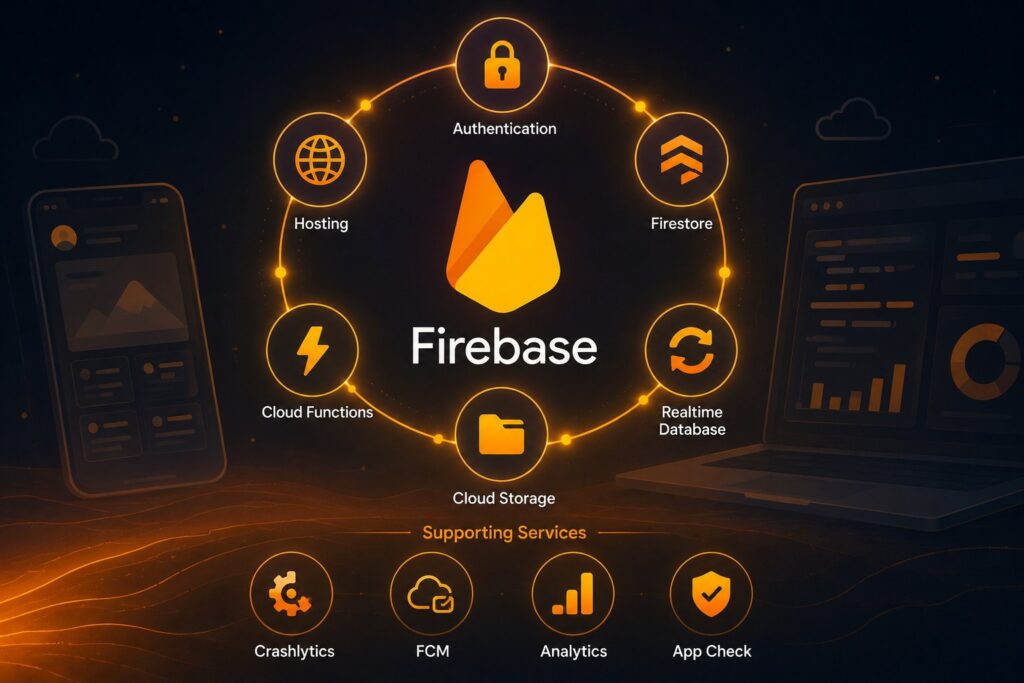
Firebase is Google’s backend-as-a-service (BaaS) platform that provides a comprehensive suite of managed services for building, running, and growing applications. Launched in 2011 by James Tamplin and Andrew Lee as a real-time database service, Firebase was acquired by Google in October 2014 and has since expanded substantially into authentication, multiple database options, file storage, serverless compute, hosting, analytics, app quality monitoring, messaging, and growth tools. Firebase remains the most widely-used BaaS platform for mobile-first applications and a substantial player in web application backends as of 2026, with millions of applications running on the platform. The two-tier pricing model (Spark Free for evaluation and small workloads, Blaze Pay-as-you-go for production) and the tight integration with the broader Google Cloud ecosystem define the platform’s commercial positioning.
This post covers what Firebase actually is, the core services that make up the platform, the two-tier pricing model and the per-service pricing on the Blaze plan, the developer experience that defines the platform, the strengths and constraints worth understanding before adopting Firebase, the relationship between Firebase and the broader Google Cloud Platform, where Firebase fits in the modern backend landscape, and the practical evaluation considerations for teams choosing a BaaS. For broader context on the BaaS category, our What Is Supabase? pillar covers the Postgres-backed alternative that has emerged as the most-discussed competing platform.
What Firebase actually is
Firebase is a unified backend platform. Instead of operating individual backend services (database, auth, storage, functions, hosting, analytics) as separate vendor relationships, you sign up for Firebase, create a project, and the services are available under one configuration, one billing relationship, and one SDK. Mobile and web applications integrate Firebase via SDKs (Swift/Kotlin/Java for native mobile, JavaScript/TypeScript for web, plus C++, Unity, and Flutter for cross-platform), and the SDKs handle the API communication, caching, offline behavior, and platform integration.
The architecture pattern that defines Firebase: the SDK runs in your application and communicates directly with Firebase’s backend services. There’s no application backend you operate; the SDK and Firebase’s services together replace what would otherwise be a server-side application layer. For applications that fit this pattern (mobile apps with relatively simple backend logic, web apps where most logic can run in the client, prototypes and early-stage products), the pattern dramatically reduces the backend infrastructure work required to ship.
The Firebase services as of mid-2026 break into several categories:
Build services are the foundational backend capabilities that applications need: Authentication, two database options (Realtime Database and Cloud Firestore), Cloud Storage, Cloud Functions, and Firebase Hosting.
Release & Monitor services support shipping and operating applications: Crashlytics for crash reporting, Performance Monitoring for application performance metrics, App Distribution for beta testing, App Check for application integrity verification, and Remote Config for runtime feature configuration.
Analytics & Engagement services support understanding and engaging users: Google Analytics for Firebase (the analytics layer), Cloud Messaging (FCM) for push notifications, In-App Messaging for targeted in-app messages, A/B Testing for controlled experiments, and Predictions for machine learning-based user behavior predictions.
Each service is documented separately, has its own pricing dimension in the Blaze plan, and can be adopted independently. Most Firebase applications use a subset (commonly Auth + Firestore or Realtime Database + Cloud Functions + Hosting + Analytics + FCM) rather than the full service catalog.
The core build services
The five build services do most of the structural work in a Firebase application:
Firebase Authentication handles user identity. Email/password sign-up, social provider integration (Google, Apple, Facebook, GitHub, Microsoft, Twitter, Yahoo, and others), phone-number OTP, anonymous authentication, multi-factor authentication, and custom authentication for federated identity. The Auth SDK manages session tokens, refresh patterns, and offline behavior. For applications that would otherwise build their own auth, the Firebase Auth integration removes substantial engineering work.
Cloud Firestore is Firebase’s flagship database, a NoSQL document store with strong query capabilities, real-time synchronization, and offline support. Data is organized in collections of documents (similar to MongoDB’s data model) with sub-collections for hierarchical relationships. Queries support filtering, ordering, pagination, and compound conditions. Real-time listeners notify clients when matching documents change, which is what makes Firebase well-suited for collaborative applications.
Realtime Database is Firebase’s original database, a JSON tree synchronized in real time across all connected clients. Older and simpler than Firestore, the Realtime Database is still actively maintained and used. Firebase’s documentation now recommends Firestore for most new projects but Realtime Database remains appropriate for applications with relatively simple data models or specific synchronization requirements.
Cloud Storage for Firebase provides file storage for user-uploaded content (images, videos, documents, audio). Built on Google Cloud Storage with Firebase-flavored access control via security rules, the service handles large files, streaming uploads and downloads, and resumable transfers. For mobile applications that need to handle user-generated content, the integration is one of the simplest of any BaaS.
Cloud Functions for Firebase runs server-side code in response to events (database changes, file uploads, authentication state changes, HTTP requests). The functions are written in JavaScript, TypeScript, or Python, deployed via the Firebase CLI, and run on Google Cloud’s serverless infrastructure. For application logic that can’t or shouldn’t run in the client SDK (sensitive operations, complex computations, integrations with third-party APIs), Cloud Functions is the standard pattern.
Firebase Hosting serves web content from Google’s global CDN with SSL, custom domains, and rapid deploy/rollback patterns. Static sites, single-page applications, and Cloud Functions-backed dynamic sites all deploy via the same Firebase CLI. For the web portion of a Firebase application, Hosting is the default delivery layer.
The five services compose into the standard Firebase application: Auth handles users, Firestore (or Realtime Database) holds the data, Storage holds the files, Functions handles server-side logic, and Hosting serves the web frontend.
Release, monitor, and engagement services
Beyond the build services, Firebase includes substantial supporting capabilities:
Crashlytics captures application crashes with full stack traces, contextual information, and aggregated reporting. The integration is one of the most loved in the Firebase suite because crash reporting that "just works" is genuinely difficult to build well.
Performance Monitoring captures application performance metrics: page load times, network request durations, custom traces. Helps teams identify performance regressions before users complain.
App Distribution enables beta testing by distributing pre-release builds to specified testers across iOS, Android, and web. Replaces ad-hoc distribution patterns (TestFlight links sent via email, APK files shared via Slack) with a unified service.
App Check verifies that requests to Firebase backend services come from legitimate instances of your application (not modified clients, bots, or unauthorized access). The pattern protects backend resources from abuse.
Remote Config lets you change application behavior without shipping a new build. Feature flags, A/B test configurations, and runtime parameters live in Firebase and the client fetches the current values on app startup.
Cloud Messaging (FCM) sends push notifications and in-app messages to users across iOS, Android, and web. The most widely-used push notification service in the industry; many non-Firebase applications use FCM specifically for push notifications.
Google Analytics for Firebase provides the analytics layer with event tracking, user properties, audience segmentation, and conversion measurement. Free across all Firebase plans and tightly integrated with the rest of the platform.
A/B Testing orchestrates controlled experiments using Remote Config for the variant distribution and Analytics for the measurement.
In-App Messaging delivers targeted messages within the application based on user behavior, properties, or events.
The supporting services compose a fairly complete application lifecycle: ship via App Distribution, monitor via Crashlytics and Performance Monitoring, protect via App Check, configure via Remote Config, engage via FCM and In-App Messaging, measure via Analytics, and optimize via A/B Testing.
The two-tier pricing model
Firebase pricing follows a deliberately simple two-tier structure:
Spark Plan (Free). The free tier with generous quotas for evaluation, learning, and small production workloads. Spark includes 50,000 monthly active users for email and social authentication, free Firestore quotas (50K reads, 20K writes, 20K deletes per day), Cloud Functions free invocations, Hosting free tier (10GB stored, 360MB/day downloaded), and unlimited use of the no-cost services (Analytics, FCM, Crashlytics, Performance Monitoring, A/B Testing, App Check, App Distribution, In-App Messaging, Remote Config).
Blaze Plan (Pay-as-you-go). The production tier that scales beyond Spark’s quotas. Each service bills per-unit beyond the free allowances. The Blaze plan also unlocks Cloud Functions deployment beyond limited free testing and enables outbound network connections from Cloud Functions (which the Spark plan blocks).
The Blaze per-service pricing (representative as of mid-2026):
Cloud Firestore bills per operation and per stored byte. Document reads cost $0.18 per 100,000, writes cost $0.18 per 100,000, deletes cost $0.02 per 100,000. Storage is $0.26 per GB-month. Network egress bills separately at Google Cloud rates.
Realtime Database bills on stored data ($5 per GB-month) and downloaded data ($1 per GB). Simultaneous connections are billed separately at scale.
Cloud Functions bills on invocations ($0.40 per million), CPU compute time (per-second after the free tier), memory (per-second after the free tier), and network egress (Google Cloud rates).
Cloud Storage for Firebase is priced like Google Cloud Storage: roughly $0.026 per GB-month stored, $0.15 per GB downloaded, plus operation charges for uploads and downloads.
Firebase Authentication is free for the first 10,000 monthly active users via email/password and social providers. Phone authentication bills per verification ($0.01 typically after the free tier, varying by region).
Firebase Hosting charges for storage and bandwidth beyond the Spark allowances. Roughly $0.026 per GB stored, $0.15 per GB egress.
The total cost depends entirely on application usage patterns. Applications with high read volume on Firestore see costs scale with reads; applications with heavy file storage see costs scale with storage; applications with frequent push notifications via FCM see no costs because FCM remains free at scale.
The honest pricing reality: Firebase costs can be very low for applications that fit the free tier patterns and meaningful for applications that scale into substantial Blaze usage. Cost modeling before committing to scale matters. Several third-party tools exist specifically for monitoring and projecting Firebase costs because the per-service-per-dimension billing can be hard to predict from baseline application metrics.
The developer experience
Firebase’s developer experience is one of the platform’s strongest dimensions, particularly for mobile-first applications. The patterns that define it:
SDKs with sensible defaults. The Firebase SDKs handle the substantial complexity of network communication, caching, offline behavior, and authentication state management transparently. For most applications, integration is a few lines of code per service.
Real-time synchronization that works. The Firestore and Realtime Database real-time listeners are the gold standard for collaborative-application backends. Multiple clients see the same data, see each other’s changes, and handle connectivity changes gracefully.
Offline support out of the box. Firestore and Realtime Database both cache locally on mobile, queue writes when offline, and reconcile when connectivity returns. Building this from scratch is genuinely hard; Firebase provides it as a default.
The Firebase Console. The web-based admin interface for managing projects, viewing data, running queries, monitoring analytics, configuring services, and reviewing crash reports. Mature, well-organized, and the daily-driver tool for most Firebase teams.
The Firebase CLI. Command-line tooling for local development, deployment, environment management, and CI/CD integration. The CLI handles emulators for local development that closely match the production behavior.
The Firebase Emulator Suite. Local emulators for Firestore, Realtime Database, Functions, Auth, Storage, and Hosting that let teams develop and test against Firebase without hitting production services. The emulators handle most behavior accurately and have become the standard development pattern for serious Firebase teams.
Strong documentation. Google maintains substantial Firebase documentation with code samples in multiple languages, conceptual guides, and reference material. The documentation quality is consistently high.
For mobile developers in particular, the Firebase developer experience is often the reason teams pick Firebase over alternatives. The SDKs are mature, the integration patterns are well-documented, and the platform "just works" for the common application patterns.
Strengths and constraints
The Firebase strengths are clear:
Speed of implementation. A Firebase-backed mobile application can be functional in days that would take weeks on a built-from-scratch backend. For prototypes, MVPs, and early-stage products, this is decisive.
Real-time and collaborative features. Multi-user real-time applications are dramatically easier on Firebase than on most alternatives.
Mature mobile SDKs. Firebase has been mobile-first since the Google acquisition; the iOS and Android SDKs are mature and well-supported.
Tight Google ecosystem integration. Firebase pairs naturally with Google Cloud services (BigQuery for analytics export, Cloud Run for additional serverless workloads, Cloud Storage for additional file storage, Vertex AI for machine learning).
Comprehensive supporting services. Crashlytics, Performance Monitoring, App Distribution, App Check, Remote Config, FCM, and A/B Testing together cover most of the application lifecycle beyond core backend services.
The constraints worth knowing:
NoSQL data model. Both Firestore and Realtime Database are NoSQL. Applications that need traditional relational queries, complex joins, or strict consistency across multiple entities have to model around the NoSQL limitations or use alternatives.
Vendor lock-in is real. Migrating from Firebase to alternative backends requires substantial work because the Firebase SDKs are deeply integrated into application code. The data is portable; the application code that uses it is not.
Cost predictability. Per-service per-dimension billing can produce surprises for applications that scale unexpectedly. Cost monitoring and projection are important operational disciplines on Firebase.
Closed-source platform. Firebase services are not self-hostable. For organizations with sovereignty constraints, regulatory requirements, or anti-lock-in policies, the closed-source nature is a meaningful consideration.
SQL is unavailable. Teams that need SQL-based querying have to work around it. Firebase Data Connect (announced in 2024) adds a PostgreSQL option but with different operational characteristics from a traditional Postgres deployment.
Firebase and Google Cloud Platform
Firebase and Google Cloud Platform (GCP) overlap meaningfully. Firebase projects are GCP projects under the hood; the same project surface up in both consoles. Firestore is GCP’s Firestore. Cloud Functions for Firebase deploys to GCP. Cloud Storage for Firebase is GCP’s Cloud Storage with Firebase access patterns.
The practical implication: a Firebase project can use GCP services that aren’t part of Firebase explicitly. BigQuery for analytics, Cloud Run for additional serverless workloads, Vertex AI for machine learning, Pub/Sub for event streaming. Teams that start on Firebase often graduate into broader GCP usage as their applications scale and their architectural needs expand.
The reverse is also true: a GCP project can use Firebase services. The boundary between "Firebase" and "GCP" is mostly a branding and developer-experience distinction rather than a technical one.
For teams making a backend platform decision, the GCP-Firebase relationship matters: choosing Firebase is implicitly a choice to commit to Google Cloud as the underlying infrastructure. For teams that have specific reasons to avoid GCP commitment, this is a meaningful consideration.
What teams evaluating Firebase should think about
Six concrete considerations:
- Validate the data model fit. Firebase’s NoSQL databases are excellent for many application patterns and constraining for others. Model your actual data requirements before committing; complex relational queries are particularly worth verifying.
- Run cost projections at realistic scale. Per-service-per-dimension billing can produce surprises. Use the Firebase pricing calculator with realistic usage estimates; budget for double your projection because actual usage often exceeds estimates.
- Test the mobile SDK integration with your specific framework. iOS Swift, Android Kotlin, React Native, Flutter, and the various cross-platform options all have SDK quality variations. Verify the integration depth for your specific tech stack.
- Plan the lock-in story. Firebase application code is more sticky than most BaaS alternatives because the SDKs are deeply integrated. If your organization has reasons to preserve migration optionality, factor this into the platform decision.
- Evaluate the supporting services for your needs. Crashlytics, FCM, and Analytics are commonly the strongest reasons teams stay on Firebase even after considering alternatives. If your application would benefit from any of these specifically, that’s a real argument for Firebase.
- Consider the broader Google Cloud relationship. Firebase commits you to GCP at the infrastructure layer. For teams with existing AWS or Azure commitments, this is worth thinking through explicitly.
The deeper takeaway is that Firebase remains a strong choice for mobile-first applications, prototypes, and projects that prioritize speed of implementation over architectural control. For teams that need traditional relational databases, want to avoid vendor lock-in, prefer open-source platforms, or have specific reasons to avoid Google Cloud commitment, the alternatives in the BaaS category are worth evaluating against Firebase rather than treating Firebase as the default.
Frequently Asked Questions
What is Firebase?
Firebase is Google’s backend-as-a-service platform that provides a comprehensive suite of managed services for building, running, and growing applications. Launched in 2011 and acquired by Google in 2014, Firebase includes Authentication, two database options (Realtime Database and Cloud Firestore), Cloud Storage, Cloud Functions serverless compute, Firebase Hosting, Cloud Messaging push notifications, Crashlytics crash reporting, Performance Monitoring, Analytics, A/B Testing, Remote Config, App Distribution, and App Check application integrity. Firebase is most widely used for mobile-first applications and remains a substantial player in web application backends.
What does Firebase cost?
Firebase uses a two-tier pricing model. Spark Plan (Free) provides generous free quotas for evaluation, learning, and small production workloads (50K MAU email/social auth, free Firestore daily quotas, free Cloud Functions invocations, free Hosting tier). Blaze Plan (Pay-as-you-go) scales beyond Spark quotas with per-service per-unit billing. Representative Blaze pricing includes Firestore at $0.18 per 100K reads and $0.26 per GB-month storage, Cloud Functions at $0.40 per million invocations, Cloud Storage at $0.026 per GB-month storage, and Hosting at $0.026 per GB-month storage with $0.15 per GB egress. Total cost depends entirely on application usage patterns.
What’s the difference between Realtime Database and Cloud Firestore?
Both are NoSQL databases with real-time synchronization, but they have different data models and querying capabilities. Realtime Database (the original, simpler database) stores data as a JSON tree with real-time sync across all connected clients; it works well for simple data models and high-frequency real-time updates. Cloud Firestore (the newer, more powerful option) uses a collection-and-document data model similar to MongoDB, with richer querying, better indexing, automatic multi-region replication, and stronger scaling characteristics. Firebase’s documentation recommends Firestore for most new projects, but Realtime Database remains actively maintained and appropriate for specific use cases.
Is Firebase only for mobile apps?
No, but Firebase has strongest support and adoption for mobile-first applications. The Firebase SDKs cover iOS (Swift), Android (Kotlin/Java), JavaScript (web), Flutter, Unity, C++, and the broader ecosystem. Web applications use Firebase widely for authentication, Firestore, Cloud Functions, Hosting, and Analytics. Mobile applications historically had a richer integration story (offline sync, push notifications, app-quality monitoring), but Firebase’s web support has grown substantially through the 2020s.
How does Firebase relate to Google Cloud Platform?
Firebase projects are Google Cloud Platform (GCP) projects with Firebase services enabled. The same project surfaces in both the Firebase Console and the GCP Console. Firestore is GCP’s Firestore. Cloud Functions for Firebase deploys to GCP. Cloud Storage for Firebase is GCP’s Cloud Storage. The practical implication: choosing Firebase commits you to GCP at the infrastructure layer, and Firebase projects can use additional GCP services (BigQuery, Cloud Run, Vertex AI, Pub/Sub) when their needs expand beyond Firebase’s branded service catalog. The Firebase-GCP boundary is mostly a developer-experience distinction rather than a technical one.
Can I self-host Firebase?
No. Firebase is a Google-managed cloud service and isn’t available for self-hosting. The Firebase Emulator Suite provides local emulators for development and testing, but it’s not a self-hostable production deployment option. Teams that need self-hostable alternatives evaluate platforms like Supabase (PostgreSQL-backed BaaS with self-hosting option), Appwrite (open-source BaaS), and others. The choice between Firebase and self-hostable alternatives often comes down to whether the organization has policy reasons or operational requirements that make managed cloud services inappropriate.
What are the limitations of Firebase?
Several constraints worth knowing. The NoSQL data model in both databases requires application-specific data modeling and doesn’t support traditional relational queries or complex joins. Vendor lock-in is real because Firebase SDKs are deeply integrated into application code. Per-service-per-dimension billing can produce surprises at scale. The platform is closed-source and only available as Google-managed service. SQL is not natively available (though Firebase Data Connect adds a PostgreSQL option with different operational characteristics). For applications and organizations where these constraints matter, alternative BaaS platforms or custom backend architectures may fit better than Firebase.
Should I use Firebase for my project?
Firebase is a strong choice for mobile-first applications, prototypes, MVPs, real-time collaborative applications, and projects that prioritize speed of implementation over architectural control. The mature SDKs, real-time synchronization, comprehensive supporting services (Crashlytics, FCM, Analytics, A/B Testing), and tight Google ecosystem integration provide substantial value. Firebase may not be the right choice for projects that need traditional relational databases, want to avoid vendor lock-in, prefer open-source platforms, have sovereignty or compliance constraints, or have specific reasons to avoid Google Cloud commitment. Evaluate against your specific project requirements and organizational constraints rather than treating Firebase as a universal default.