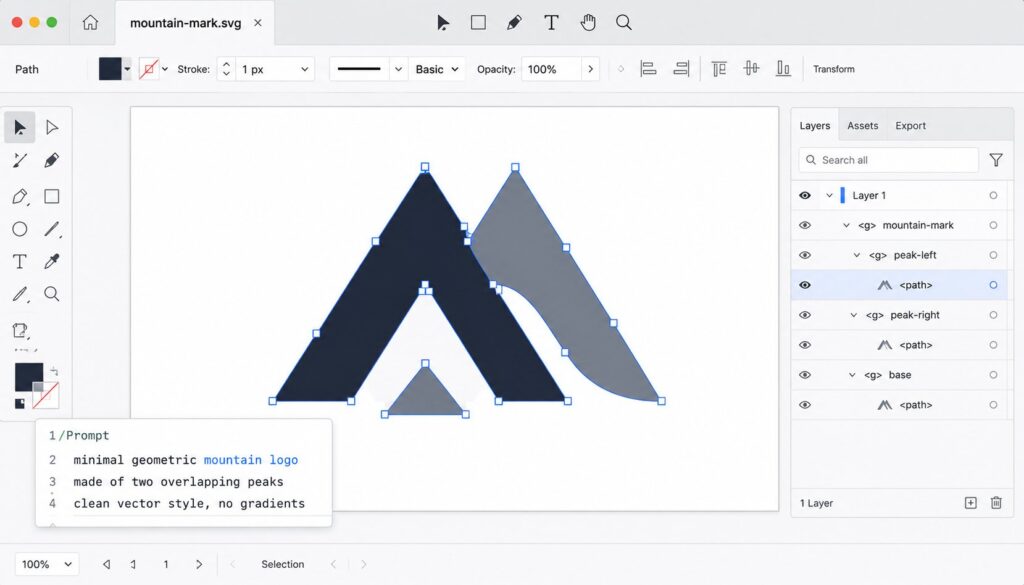
Recraft V4.1 SVG generation is Recraft’s most distinctive capability in mid-2026. Released May 14, 2026 as part of the broader Recraft V4.1 model family, the V4.1 Vector variant produces actual native SVG output (XML-based vector format with clean editable paths and anchor points) rather than raster images presented with vector aesthetic. The distinction matters substantially: real SVG can be edited in Illustrator, Figma, or any other vector tool, scaled to any resolution without quality loss, and used for both web and print without re-rendering. V4.1 Vector PRO is the higher-tier variant, and Recraft’s model documentation puts generation at 15 seconds against 12 seconds for the base vector model. Worth stating plainly, because Recraft’s own marketing does not: this is an iteration rather than a first. Recraft’s API price list already carried V2 Vector, V3 Vector, V4 Vector and V4 Pro Vector, and its V4 documentation described V4 as the only model capable of generating editable, production-quality SVG. V4.1 refines a capability Recraft has shipped for some time.
This post is a focused drill-down into what V4.1 Vector actually produces, how the SVG output compares to traditional design workflows, the practical use cases where the model excels, the limitations worth understanding, and the integration patterns for design teams adopting the capability. For the broader Recraft platform context, our What Is Recraft? pillar covers the platform as a whole.
What V4.1 Vector actually produces
V4.1 Vector generates SVG files. The output isn’t an AI-traced vector approximation of a raster image; it’s vector output that was generated as vector from the start. The technical distinction matters for several reasons:
Clean paths. Generated SVGs have organized path structure rather than the noisy auto-traced paths that come from raster-to-vector conversion. Paths are reasonable in count (not thousands of redundant points), well-organized hierarchically, and editable in any vector tool.
Anchor points are meaningful. Anchor points correspond to actual design intent rather than the dense grid points that auto-tracing produces. Adjusting a single anchor point has the effect you’d expect; the design is structurally edit-friendly.
Layers and groups are preserved. The SVG structure includes meaningful layer and group organization. A logo with text and a symbol arrives with the text and symbol as separate groups that can be modified independently.
Color is structured. Fills and strokes use named colors or properly-defined palette references rather than embedded raster pixel data. Changing the color of an element is a one-line SVG edit rather than a recoloring exercise.
The output is scalable. That’s the fundamental SVG property; the output renders cleanly at any resolution from a 16-pixel favicon to a billboard print. For brand assets that need to work across formats, this is the whole point.
Editable in standard tools. Open the SVG in Illustrator, Figma, Sketch, Inkscape, or any other vector editor. The file behaves like vector content because it is vector content. No conversion step, no quality loss, no "good enough" approximation of what the design actually needs to be.
The technical capability isn’t easy. AI models that generate raster images train on pixel grids; vector generation requires the model to output structured XML that describes shapes mathematically. Most AI image generators don’t attempt vector output because the architectural patterns don’t transfer directly. Recraft’s V4.1 Vector is the result of specialized training and architecture choices specifically for the vector generation problem.
The May 2026 release context
V4.1 Vector launched on May 14, 2026, as part of the broader V4.1 model family that included V4.1 (general raster), V4.1 Vector (SVG), and V4.1 Utility (production design utility). The release context:
V4.1 represented Recraft’s response to a competitive landscape that was moving fast. OpenAI’s GPT Image 2 and 1.5 had set new quality bars for raster generation. Google’s Nano Banana 2 and Pro variants were genuinely competitive. Recraft needed to demonstrate continued differentiation, and V4.1 Vector was the headline capability that did so.
The benchmark claim needs reading carefully. Recraft’s own press release says V4.1 Utility Pro became the highest-ranked model outside Google and OpenAI, which is a claim about being the third-ranked lab rather than the third-ranked model. On the Artificial Analysis Image Arena leaderboard it cites, dated May 30, 2026, the models above it are GPT Image 2, GPT Image 1.5, Nano Banana 2 and Nano Banana Pro, placing Recraft fifth by model. For an independent lab competing against the largest AI vendors that is still a meaningful position, and it is a vendor-cited benchmark either way. V4.1 Vector does not appear on that leaderboard at all, since it measures raster quality.
The pricing model adjusted for V4.1 Vector specifically. Vector output consumes more credits per generation than equivalent raster generation, reflecting the additional model capability required. The cost is reasonable for design teams whose use cases justify it; it’s higher than generic raster generation for teams that don’t specifically need vector output.
Integration improvements rolled out alongside the model. The Figma plugin was updated for the new model. The API exposed V4.1 Vector as a model selection. The platform workflow tooling integrated vector output into the standard generation experience rather than treating it as a separate product surface.
The release positioning was clear: V4.1 Vector is the capability that makes Recraft genuinely differentiated from generic AI image generators, and the platform built around it accordingly.
Where V4.1 Vector excels
The use cases where V4.1 Vector produces substantial value:
Logo generation. Multiple logo concepts in vector form, ready for editing and refinement in standard design tools. The pattern that previously required substantial designer time per concept becomes a generation-and-iteration session.
Icon set development. Generate consistent icon families with shared visual language. The vector output means icons can be sized for any application (16px favicons, 24px UI icons, 128px app icons) from a single source.
Typography work. Vector-based custom typography, lettering, and word marks. The output is editable letter-by-letter rather than locked into a single rendered output.
Brand illustrations. Illustrations that need to maintain a consistent style across many assets. Generate the illustrations as vector and they remain consistent regardless of where they’re used.
Web graphics that need to scale. Hero illustrations, infographics, decorative elements that should look crisp at any resolution including future high-DPI displays. SVG is the right format; V4.1 Vector generates it directly.
Print-ready assets. Magazine illustrations, marketing collateral, packaging design elements where vector is required for production. V4.1 Vector output can go directly into print workflows without rasterization.
App icons. App store icons that need to render cleanly at multiple sizes. Vector source means one generation supports every required size.
SVG animation source material. SVGs animated via CSS or JavaScript libraries need to be vector-source; V4.1 Vector produces output compatible with animation workflows.
Design system asset generation. Companies maintaining design systems with many vector assets benefit from generation that matches their existing system’s visual language (via style referencing) while producing assets in the format the system uses.
For each of these use cases, the alternative without V4.1 Vector is either substantial designer time per asset, expensive licensed stock vector libraries with limited customization, or raster AI generation followed by manual vector tracing (which produces noisy paths and loses the AI-generation speed advantage).
Limitations worth understanding
V4.1 Vector has genuine limitations that affect specific use cases:
Complex photorealistic imagery isn’t a fit. SVG is mathematical shapes; photorealistic imagery requires pixel-level information that vector format can’t efficiently represent. For photo-realistic hero images, V4.1 (raster) or competing models are the right tools.
Highly detailed illustrations have practical limits. A vector illustration with millions of paths becomes impractical to render and edit. V4.1 Vector targets the design-asset use case (logos, icons, brand illustrations, typography) rather than the cinematic-illustration use case where path counts would explode.
Style range is design-aesthetic-focused. The model is tuned for design work (logos, icons, brand illustrations) rather than fine-art aesthetic exploration. For pure creative exploration where you want unexpected aesthetics, generic raster models often produce more interesting results.
Text rendering is improving but imperfect. Vector typography is one of V4.1 Vector’s distinctive capabilities, but text generation in any AI model is imperfect. Verify the text in generated logos and brand marks; expect to do some editing for production-ready typography.
Iteration is more expensive than raster. Vector generation consumes more credits than raster, and you’ll typically iterate through several generations to get production-ready output. Budget credit consumption against expected iteration patterns.
Generation takes 12 to 15 seconds. Recraft documents 12 seconds for V4.1 Vector and 15 for V4.1 Vector PRO. Faster than commissioning a designer, slower than the near-instant turnaround of some raster models, and enough to affect the rhythm of interactive exploration.
For most design-team use cases, the limitations are manageable and the differentiated capability is what matters. For use cases where the limitations dominate (photorealism, fine-art exploration, instant generation), V4.1 Vector isn’t the right tool. That’s a workload-selection question rather than a model-quality question.
Integration patterns for design teams
Design teams adopting V4.1 Vector typically integrate it in one of three patterns:
Pattern 1: Generation-then-refinement. Designers use V4.1 Vector to generate initial concepts, then refine the best output in Figma or Illustrator for production. The pattern accelerates the early ideation phase; final production work happens in standard tools. Most common pattern; works for most use cases.
Pattern 2: Brand-pipeline generation. Marketing teams or content operations build pipelines that generate brand-consistent assets at scale via the Recraft API. The pattern uses style libraries and brand kits to ensure consistency; the API produces vector output that flows into content management systems or asset libraries. Common for scaled marketing operations.
Pattern 3: Embedded product capability. Product teams building AI image generation into their own products use the Recraft API as the vector-generation backend. The product handles the user-facing workflow; Recraft produces the vector output. Common for design platforms, brand identity tools, and content creation products.
Each pattern has its own optimization profile. Generation-then-refinement optimizes for individual designer productivity. Brand-pipeline generation optimizes for consistency at scale. Embedded product capability optimizes for cost economics and API integration depth.
For teams adopting V4.1 Vector for the first time, Pattern 1 is typically the right starting point. Patterns 2 and 3 build on the Pattern 1 learnings about what generates well and what requires refinement.
Where it fits in a design pipeline
Six concrete actions:
- Evaluate V4.1 Vector with your actual brand-asset use cases. Generate the kinds of logos, icons, or illustrations your team actually needs. Verify the output is clean SVG that survives editing in your standard tools.
- Set up brand color conditioning and style libraries before serious evaluation. V4.1 Vector’s differentiation increases substantially when it’s generating within your brand context rather than producing generic output. Configure the brand context first; evaluate against branded generations.
- Test the Figma plugin integration if your team works primarily in Figma. The plugin workflow is substantially smoother than generating in the Recraft web app and importing.
- Budget credit consumption for realistic iteration patterns. Vector generation consumes more credits than raster; iteration is typical; verify the credit math against expected use volume.
- Plan the production refinement workflow. AI-generated vector is excellent starting material but rarely production-perfect on first generation. Plan for some refinement in Illustrator or Figma; budget the time accordingly.
- Consider Pattern 2 or 3 if your use case justifies it. For scaled marketing or product integration, the API path produces different economics than subscription generation. Model the cost and workflow against your actual scale.
The deeper takeaway is narrower than Recraft’s framing suggests. Native SVG generation is not new, and Recraft has shipped vector models since V2. What V4.1 changes is quality and speed inside a capability the company already held largely to itself, and the practical question for a design team is whether 12 to 15 seconds of generation produces paths clean enough to hand to a designer without unpicking them first.
Frequently Asked Questions
What does Recraft V4.1 Vector actually generate?
Real SVG files with clean editable paths, meaningful anchor points, preserved layer and group organization, and structured color references. The output isn’t an AI-traced vector approximation of a raster image; it’s vector output generated as vector from the start. The files open in Illustrator, Figma, Sketch, Inkscape, or any other vector editor and behave like vector content because they are vector content. Designers can edit individual paths, adjust colors, modify shapes, and use the output as production-quality vector source material.
When was V4.1 Vector released?
May 14, 2026, as part of the broader Recraft V4.1 model family that also included V4.1 (general raster) and V4.1 Utility (production design utility). Recraft says V4.1 Utility Pro became the highest-ranked model outside Google and OpenAI on the Artificial Analysis Image Arena leaderboard of May 30, 2026, which places it fifth by model and third by lab. V4.1 Vector does not appear on that leaderboard, which measures raster quality.
How does V4.1 Vector differ from auto-tracing a raster image?
Substantially. Auto-tracing converts raster pixel data into vector approximation through edge detection and path-fitting algorithms. The output typically has noisy paths with thousands of redundant points, color blocks that don’t match brand colors, no meaningful layer structure, and editing difficulty because the auto-traced paths don’t correspond to design intent. V4.1 Vector generates SVG as native vector from the start, producing clean paths that match design intent, structured color, preserved organization, and edit-friendly output that behaves like designer-created vector content.
What use cases are best for V4.1 Vector?
Logo generation, icon set development, typography work, brand illustrations, web graphics that need to scale across resolutions, print-ready assets, app icons that need multiple size renders, SVG animation source material, and design system asset generation. The common pattern across these use cases is needing scalable editable vector output rather than fixed-resolution raster. For photorealistic imagery, fine-art aesthetic exploration, or workflows requiring near-instant generation, V4.1 Vector isn’t the right fit; raster alternatives are more natural choices.
How long does V4.1 Vector take to generate?
Recraft’s model documentation gives 12 seconds for V4.1 Vector and 15 seconds for V4.1 Vector PRO. Faster than commissioning a designer for vector assets, slower than the near-instant turnaround of some raster models. For interactive exploration that cycle time affects rhythm; for production asset generation it is reasonable.
Can I use V4.1 Vector through an API?
Yes. Recraft offers a commercial API with V4.1 Vector as a selectable model variant. The API is the right path for teams building Recraft into their own products, scaled marketing operations producing brand-consistent assets programmatically, and product teams that need vector generation as a backend capability rather than an interactive user experience. API pricing is per-generation at rates higher than V4.1 base because of the additional model capability.
What are the limitations of V4.1 Vector?
Complex photorealistic imagery isn’t a fit because SVG is mathematical shapes that can’t efficiently represent pixel-level information. Highly detailed illustrations have practical limits because vector files with millions of paths become impractical. Style range is design-aesthetic-focused rather than fine-art exploration-focused. Text rendering is improving but imperfect; verify generated typography. Iteration consumes more credits than raster generation. Generation time of 12 to 15 seconds affects interactive workflow rhythm. For most design-team use cases the limitations are manageable; for use cases where they dominate, raster alternatives are more natural choices.
How should design teams adopt V4.1 Vector?
Start with Pattern 1 (generation-then-refinement) where designers use V4.1 Vector to generate initial concepts and refine the best output in Figma or Illustrator for production. The pattern accelerates ideation while keeping final production work in standard tools. As the team learns what generates well and what requires refinement, Pattern 2 (brand-pipeline generation for scaled marketing operations) and Pattern 3 (embedded product capability for AI-image-generation product features) become accessible. For most design teams, starting with Pattern 1 and growing from there is the right adoption sequence.