Recraft is the AI image generation platform that has distinguished itself in a crowded market by specializing in two capabilities most competitors don’t focus on: native SVG vector generation for logos, icons, typography, and illustrations, and brand-consistent output through style referencing and brand-color conditioning. Founded as a specialized image-generation lab, Recraft launched its proprietary V4 model family in late 2025 and the current V4.1 series in May 2026, with three variants serving different use cases: V4.1 for general raster work, V4.1 Vector for native SVG output, and V4.1 Utility for production design work. V4.1 Utility Pro became the third-ranked text-to-image model worldwide on public benchmarks in 2026, sitting behind only OpenAI’s GPT Image 2 and 1.5 and Google’s Nano Banana 2 and Pro variants, a notable position for an independent specialized lab competing against models from major AI vendors. This post covers what Recraft actually is, the V4.1 model family in detail, the platform features that distinguish the product from generic image generation services, the pricing model, the use cases where Recraft excels, and the practical evaluation considerations.
For broader AI image generation context, this is a foundational pillar; our companion piece Recraft V4.1 SVG Generation drills into the specific vector capabilities that V4.1 Vector unlocks for design teams.
What Recraft actually is
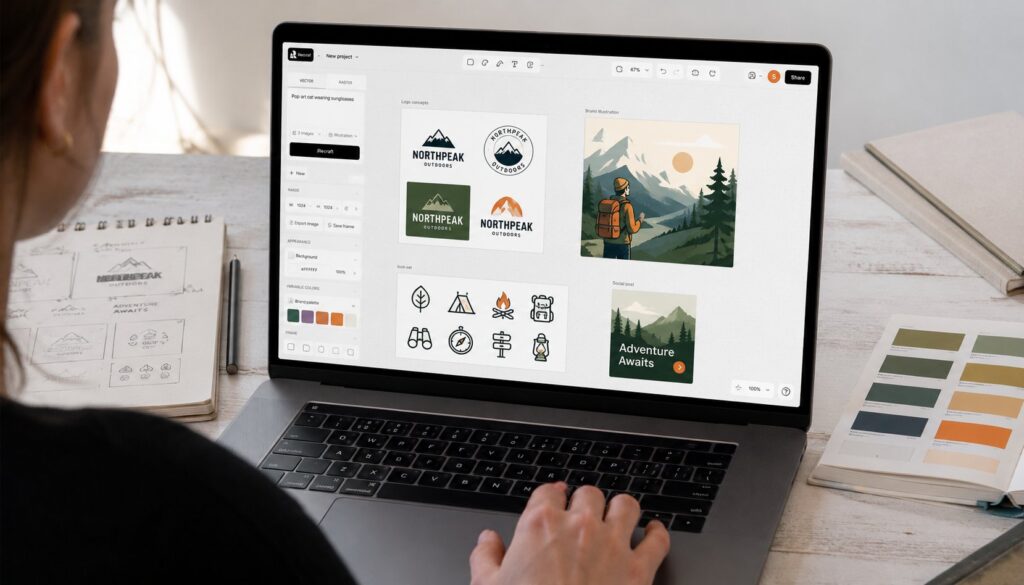
Recraft is an AI image generation platform with a deliberately design-focused positioning. The basic flow: prompt the model with a text description (and optionally style references, brand colors, or layout constraints), the platform generates one or more candidate images, and you iterate via editing tools or new generations until you have the asset you need. The platform supports both raster output (PNG, JPG, WebP) and native SVG vector output, which is genuinely distinctive in the AI image generation market.
The pieces that distinguish Recraft from generic AI image generators:
Native SVG generation. Most AI image generators produce raster output regardless of what the use case actually needs. Recraft’s V4.1 Vector produces real SVG output with clean paths, anchor points, and the ability to edit individual elements in Illustrator, Figma, or any other vector tool. For logos, icons, and brand assets that need to scale across resolutions, the difference between "raster trace of vector style" and "actual editable vector" is substantial.
Brand-color conditioning. You can specify exact hex codes or palette files that the model adheres to during generation. The output stays in your brand palette rather than producing colors the model finds aesthetically pleasing but inconsistent with your brand.
Style referencing. Upload reference images (a brand style guide, an existing illustration set, a moodboard) and Recraft generates new content consistent with the reference style. The pattern is what makes the platform practical for in-house brand work where consistency across many images matters more than peak quality on any single image.
Infinite canvas workspace. Instead of generating individual images in isolation, Recraft’s workspace lets you arrange generations spatially on an infinite canvas, branch from existing images, organize sets of related assets, and maintain visual context across an extended generation session.
Inpainting and editing. Modify portions of existing images via natural-language prompts or paint masks. Replace a face, change a background, adjust a logo position. The editing pattern is integrated into the same workspace as generation rather than living as a separate tool.
Image upscaling. Bring lower-resolution images up to higher resolution with AI-based super-resolution. Useful for old assets that need to fit new format requirements.
Node-based workflows. For power users building reusable generation pipelines, Recraft provides node-based workflow tools that chain multiple generation and editing steps into reusable templates.
Plugins for Figma and Framer. Generate Recraft images directly inside design tools without leaving the design workflow. Particularly useful for teams that live in Figma daily.
Video generation across 20+ models. Beyond image generation, Recraft provides video generation that orchestrates across multiple underlying video models from various providers, with the same brand-consistency controls applied to motion content.
Commercial API. Programmatic generation for teams building Recraft into their own products and workflows.
The combination targets a specific user profile: design teams, brand-conscious marketing teams, and creative professionals who need both AI generation speed and the brand consistency that generic models don’t reliably provide.
For broader AI tooling context, our Midjourney coverage covers the most prominent competing platform in the AI image generation space, and our Google Dreambeans coverage covers Google’s recent consumer AI image product.
The V4.1 model family
The V4.1 series released in May 2026 includes three variants, each tuned for a specific use case:
Recraft V4.1 is the general raster image generation model. Tuned for high-quality photorealism, illustration, and aesthetic output across a broad range of styles. The base model that most general image-generation use cases run on.
Recraft V4.1 Vector is the SVG-native variant. Tuned for vector output: logos, typography, icons, illustrations with clean lines and editable paths. The output is real SVG (XML-based vector format), not raster images presented as vector. For brand and design teams, this is the variant that justifies Recraft over alternatives.
Recraft V4.1 Utility is the production design utility variant. Tuned for high-volume design work where speed and consistency matter more than peak aesthetic quality on any single generation. V4.1 Utility Pro became the third-ranked text-to-image model worldwide on public benchmarks in 2026, sitting between Google’s Nano Banana variants and the broader pack. For production design pipelines that need to generate hundreds or thousands of images with consistent output quality, V4.1 Utility is the practical workhorse.
Each variant has a Pro tier with additional capabilities (higher resolution output, longer prompts, more sophisticated style referencing, faster generation). The Pro tiers are accessible through the higher Recraft subscription plans and the commercial API.
The three-variant strategy is notable because most AI image generators ship a single model and ask users to handle every use case with one tool. Recraft’s segmentation acknowledges that different use cases need different tradeoffs: photorealism uses different prompting patterns than vector logo generation, and bulk utility work needs different tuning than aesthetic peak output.
Platform features in depth
Beyond the core generation models, several Recraft platform features are worth understanding:
Style libraries. Save style references as reusable libraries that you can apply to new generations. For brand work, this means setting up a brand style library once and then applying it consistently across all subsequent generations.
Brand kits. Centralized brand configuration: palette, typography references, logo files, style guidelines. Generations can reference the brand kit to maintain consistency.
Prompt libraries. Save effective prompts as reusable templates. For teams that have figured out which prompt patterns work for their use cases, the libraries prevent the loss of institutional prompting knowledge.
Custom templates. Pre-configured generation templates for specific output types (Instagram square, LinkedIn banner, product hero image, app icon, etc.) with appropriate dimensions and style defaults.
Collaboration in shared spaces. Team workspaces with multiple members, shared style libraries, shared brand kits, shared prompt libraries, and visibility into who generated what. The collaboration pattern matters for teams larger than a single designer.
Version history. Generated images are versioned; you can return to earlier states, branch from any version, and compare alternatives.
Export options. Output in PNG, JPG, WebP, SVG (for the Vector variant), and other format options depending on the variant used. Resolution options scale with subscription tier.
The platform features add up to a workflow tool that’s substantially more design-team-friendly than the generic AI image generators that focus on single-image generation in isolation.
Pricing
Recraft pricing as of mid-2026:
Free ($0). 50 daily credits for personal use. Generated images are public on the Recraft community feed. No commercial rights. Suitable for evaluation and personal experimentation.
Pro ($10/month billed annually, slightly more month-to-month). 1,000 credits per month. Commercial rights to the output. Private generation. Higher resolution outputs. The starting point for commercial use; most individual designers and small teams use this tier.
Higher tiers scale up credit allowances, add team collaboration features, provide API access, and include additional brand and style libraries. The exact tier names and prices change as Recraft adjusts the product; check the current pricing page for specifics.
API pricing is per-generation rather than subscription, with rates that vary by model variant. V4.1 Vector and V4.1 Utility Pro are higher-priced than V4.1 base because of the additional model capability. For teams building Recraft into products at scale, the API pricing is the relevant economics.
Credit consumption varies by generation type. High-resolution generations consume more credits than standard. Video generation consumes substantially more credits than image generation. Vector output may consume more than raster output. Plan credit consumption against expected use volume.
The pricing model is generally affordable for individual designers and small teams; at higher scale, the API pricing becomes the dominant cost. For brand-consistent generation at scale, Recraft’s pricing is typically competitive with the alternatives once you factor in the time savings from brand-color conditioning and style referencing.
Use cases where Recraft excels
Recraft’s strengths are clearest in specific use cases:
Brand asset generation. Logos, icons, brand illustrations, marketing imagery that needs to maintain visual consistency across many assets. The brand-color conditioning and style referencing make this dramatically easier than starting from a generic model.
Vector graphics work. Logo generation, icon set development, typography work, illustrations meant for both web and print. V4.1 Vector’s native SVG output is the platform’s distinctive capability.
High-volume design pipelines. Marketing teams generating hundreds of images per week. V4.1 Utility’s consistency at scale is the production workhorse.
Design tool integration. Teams that work primarily in Figma or Framer benefit substantially from the plugins that bring Recraft generation into the design environment.
Brand-consistent video. When video assets need to match brand visual identity, Recraft’s brand-consistency controls extend to video generation. The pattern is less common than image work but real.
API-integrated products. Teams building AI image generation into their own products (design platforms, marketing automation tools, content systems) use Recraft’s API for the brand-consistent generation that generic API offerings don’t provide as cleanly.
The cases where Recraft is less natural than alternatives:
Maximum photorealism for single hero images where peak quality on one image matters more than consistency across many. GPT Image and Nano Banana variants generally produce higher peak quality on single generations.
Highly experimental creative exploration where you want the model to surprise you with unexpected aesthetics. Generic models with broader training are often more interesting for pure creative exploration.
Tightly budgeted casual use where the credit consumption math doesn’t justify the subscription. The free tier covers some use, but heavy users on tight budgets sometimes use free Stable Diffusion alternatives or generic free tiers from larger vendors.
What teams evaluating Recraft should think about
Six concrete considerations:
- Try the free tier with your actual use cases. 50 daily credits is sufficient for serious evaluation. Generate the kinds of images you actually need; the platform fit is much clearer with real work than with generic example prompts.
- Test the SVG generation specifically. If vector output is part of why you’re evaluating Recraft, V4.1 Vector is the variant that matters most. Generate the actual kinds of logos and icons you need; verify the output is clean, editable, and on-brand.
- Set up a brand kit early. The brand-color conditioning and style referencing are most of Recraft’s distinctive value; using the platform without configuring brand context produces output that’s no better than generic alternatives.
- Evaluate the Figma or Framer plugin integration if your team works in those tools. The workflow integration is substantial enough to drive adoption decisions for design teams.
- Plan the API economics if you’re building Recraft into products. Subscription pricing scales differently from API pricing; verify which model fits your actual use volume.
- Compare against the strongest single-image alternatives for hero work. Recraft’s strength is consistency at scale; for occasional peak-quality hero images, generic alternatives may produce better single results. Most teams use Recraft for the bulk of brand work and reserve single-shot hero work for the model that best fits each case.
The deeper takeaway is that Recraft in 2026 occupies a deliberate niche in the AI image generation market: brand-consistent vector and design work at scale, with the V4.1 family providing genuine differentiation through native SVG output and brand controls that generic image generators don’t match. For design teams, brand-conscious marketing teams, and creative professionals who need both AI generation speed and the brand consistency that generic models don’t reliably provide, Recraft is a strong choice. For occasional users who don’t need the brand-consistency story, generic alternatives may fit better.
Frequently Asked Questions
What is Recraft?
Recraft is the AI image generation platform specializing in high-quality raster output and best-in-class native SVG vector generation through its proprietary V4.1 model family. The platform distinguishes itself from generic AI image generators through native SVG output for logos and vector work, brand-color conditioning that constrains generation to specific brand palettes, style referencing for consistency across many images, infinite canvas workspace, plugins for Figma and Framer, and commercial API access. Recraft V4.1 Utility Pro became the third-ranked text-to-image model worldwide on public benchmarks in 2026.
What’s special about Recraft’s vector generation?
V4.1 Vector produces actual SVG output (XML-based vector format with editable paths and anchor points) rather than raster images with vector aesthetic. The distinction matters substantially because real SVG can be edited in Illustrator, Figma, or any other vector tool, scaled to any resolution without quality loss, and used for both web and print without re-rendering. Most AI image generators produce only raster output regardless of the use case. For logo work, icon sets, typography, and illustrations meant to scale across formats, V4.1 Vector is genuinely differentiated.
What does Recraft cost?
Pricing tiers as of mid-2026. Free ($0): 50 daily credits for personal use with public images and no commercial rights, sufficient for evaluation. Pro ($10/month billed annually): 1,000 monthly credits, commercial rights, private generation, higher resolution. Higher tiers scale credits, team collaboration, and API access. API pricing is per-generation with rates varying by model variant. Credit consumption varies by generation type (high-resolution, video, and vector output consume more credits than standard generations).
Who is Recraft built for?
Design teams, brand-conscious marketing teams, and creative professionals who need both AI generation speed and the brand consistency that generic models don’t reliably provide. Specific use cases where Recraft excels include brand asset generation (logos, icons, marketing imagery with brand consistency), vector graphics work (logos, icons, typography, illustrations needing SVG output), high-volume design pipelines (hundreds of images per week with consistent output), design tool integration (Figma and Framer plugins for design environment workflows), and API-integrated products (commercial generation with brand controls).
What are the three V4.1 variants?
V4.1 is the general raster image generation model, tuned for photorealism and illustration across a broad range of styles. V4.1 Vector is the SVG-native variant, tuned for vector output: logos, typography, icons, illustrations with editable paths. V4.1 Utility is the production design utility variant, tuned for high-volume design work where speed and consistency matter more than peak aesthetic quality on any single generation. V4.1 Utility Pro became the third-ranked text-to-image model worldwide on public benchmarks in 2026. Each variant has a Pro tier with additional capabilities (higher resolution, longer prompts, faster generation).
How does Recraft compare to Midjourney and DALL-E?
Each platform occupies a distinct position. Recraft’s strengths are native SVG generation, brand consistency through color conditioning and style referencing, and high-volume design utility work. Midjourney’s strengths are aesthetic creative exploration with a distinctive visual character. GPT Image (DALL-E’s successor) and Google’s Nano Banana are stronger for maximum photorealism on single hero images. For design teams that need consistency at scale and vector output, Recraft is often the better fit. For pure creative exploration or single peak-quality images, the alternatives may be more natural choices. Many teams use multiple platforms for different workloads.
Can I use Recraft images commercially?
Yes, on the paid tiers. The free tier produces images that are public on the Recraft community feed and don’t include commercial rights, which makes the free tier appropriate for evaluation and personal experimentation but not commercial use. Pro and higher tiers include commercial rights to the generated output. Verify the specific licensing terms on the current Recraft pricing page; the exact terms can shift as the product evolves.
Does Recraft have an API?
Yes. Recraft offers a commercial API for programmatic generation, with rates that vary by model variant. V4.1 Vector and V4.1 Utility Pro are higher-priced than V4.1 base because of the additional model capability. The API is the right path for teams building Recraft into their own products and workflows; the subscription tiers are the right path for individual designers and small teams using the platform directly.