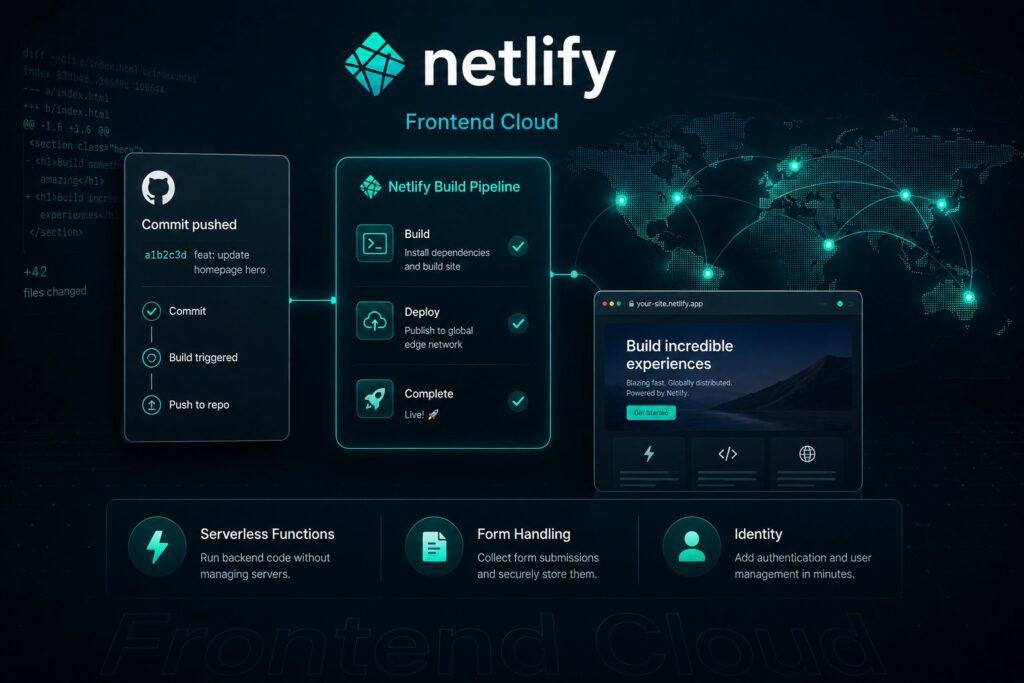
Netlify is a frontend cloud platform that hosts modern web applications with Git-based continuous deployment, global CDN delivery, serverless functions, and an integrated developer experience designed to make shipping frontend projects as fast as possible. Founded in 2014 by Matt Biilmann and Christian Bach, Netlify is best known for coining and championing Jamstack, the architectural pattern that pairs pre-built static frontends with on-demand serverless APIs and managed services. In the years since, Jamstack has become a default architecture for modern web development, and Netlify’s platform has evolved alongside it to support server-side rendering (SSR), edge functions, headless commerce integrations, and the broader composable architecture that defines mid-2020s frontend infrastructure. As of 2026, Netlify operates as one of three major frontend cloud platforms (alongside Vercel and Cloudflare Pages) that serve the modern frontend developer market, with each platform occupying a distinct strategic position.
This post covers what Netlify actually is, the Jamstack pattern Netlify pioneered, the core platform features, the 2026 pricing model (including the April 14, 2026 change that removed per-seat charges on the Pro tier), the developer experience that defines the platform, the framework integrations Netlify supports, where Netlify fits in the broader frontend cloud landscape, and the practical evaluation considerations for teams choosing a frontend platform. For context on the broader landscape, our What Is Vercel? pillar covers the adjacent frontend cloud platform, and we maintain a separate Netlify-vs-Vercel comparison piece that examines the two as direct alternatives.
What Netlify actually is
Netlify is the cloud platform that hosts your frontend code and delivers it to users. The technical positioning: instead of managing servers, configuring CDN distribution, setting up build pipelines, provisioning serverless functions, handling SSL certificates, and integrating preview environments for every pull request, you push code to a Git repository, connect that repository to Netlify, and the platform handles the rest. The deployment that follows is automatic, the delivery is fast, and the operational overhead that traditional hosting requires mostly disappears.
The pieces Netlify provides:
Continuous deployment from Git. Every push to your repository triggers a build. The build output deploys to Netlify’s global edge network. The whole cycle (commit, build, deploy) typically completes in under two minutes for typical frontend projects.
Global CDN delivery. Built sites serve from Netlify’s edge network with sub-second response times globally. SSL is automatic. Custom domains attach in a few clicks.
Deploy Previews. Every pull request gets its own deploy preview URL that mirrors the production build with the PR’s changes. Reviewers see the actual rendered site rather than approving code blindly. The pattern is now an industry default; Netlify popularized it.
Serverless Functions. Server-side logic runs as functions deployed alongside your frontend, accessible from the same Git repository, configured the same way, and managed in the same platform.
Edge Functions. Lighter-weight functions that run at the edge (close to the user) rather than in a centralized region. Faster cold starts, lower latency, suitable for personalization, A/B testing, and request modification.
Form handling. Built-in form processing without a backend. HTML forms with the netlify attribute submit directly to Netlify’s form-processing layer, which captures submissions, sends notifications, and integrates with downstream tools.
Identity. Built-in user authentication, registration, and account management. Saves teams from operating their own auth infrastructure for projects where Auth0 or Clerk would be overkill.
Rollback. Every deploy is immutable and addressable; rolling back to any previous version is a one-click operation.
For broader frontend architecture context, our What Is a Headless CMS? pillar covers the content-side architecture that frequently pairs with Netlify’s frontend hosting.
The Jamstack pattern Netlify pioneered
Netlify didn’t just build a frontend hosting platform; it championed an architectural pattern. In 2016, Netlify co-founder Matt Biilmann coined "Jamstack" (originally JAMstack: JavaScript + APIs + Markup) to describe a then-emerging way of building web applications that broke from the traditional server-rendered model.
The Jamstack pattern in plain language:
Pre-build the markup at build time. Instead of generating HTML on every request with a server-side template engine, pre-build the static HTML during the deploy step. The output is files that the CDN can serve directly without any server computation per request.
Add interactivity with JavaScript. Where pages need dynamic behavior (forms, user-specific content, real-time updates), JavaScript running in the browser handles it. The browser hits APIs for the dynamic pieces while the static pieces serve straight from the CDN.
Use APIs for everything else. Backend logic, data storage, user authentication, payments, search, and other dynamic capabilities live as APIs (your own, third-party, or hybrid) that the JavaScript layer calls.
The pattern’s benefits compared to traditional server-rendered web:
Performance. Pre-built static HTML serves from the CDN with no server computation. Sub-second response times globally are achievable without exotic infrastructure.
Scale. Static CDN delivery scales effortlessly. Traffic spikes that would overwhelm server-rendered sites barely register on Jamstack architecture.
Security. No server-side rendering means no server-side attack surface for many traditional web vulnerabilities. The attack surface shrinks substantially.
Developer experience. Building and deploying static files is simpler than operating server infrastructure. The deploy-on-commit pattern that Netlify pioneered fits well with modern Git workflows.
Jamstack has evolved since 2016. Pure static sites have given way to hybrid patterns that mix pre-built static pages with server-side rendered (SSR) and incremental static regeneration (ISR) for pages that need fresher content. The "JAMstack" name simplified to "Jamstack" (with lowercase styling). The pattern is now the default architecture for modern frontend development across the React, Vue, Svelte, and other major frontend frameworks.
For deeper Jamstack-adjacent context, our What Is Vercel? pillar covers Vercel’s evolution of the pattern (especially the Next.js + SSR combination), and our Jamstack-focused satellites in the broader content series cover specific architectural decisions teams face.
The developer experience
Netlify’s developer experience is one of the platform’s strongest dimensions. The patterns that define it:
Git as the deployment trigger. Push to main; production deploys. Push to a branch; that branch deploys to a preview URL. The mental model maps directly onto how engineering teams already think about code changes. No separate deployment workflow to learn.
Configuration as code. netlify.toml in the repository root configures everything (build commands, environment variables, redirects, headers, functions). Configuration travels with the code, versions with Git, and reviews in pull requests like any other change.
The Netlify CLI. Local development that closely matches the production environment. Functions run locally, edge functions emulate, environment variables sync. The dev-prod gap that plagues some platforms is narrower with Netlify than with most.
Sensible defaults. Most projects work without configuration. Drop in a Next.js, SvelteKit, Astro, Nuxt, Remix, or Gatsby project; Netlify autodetects the framework and configures appropriately. Custom configuration is available when needed but not required for most projects.
Strong build feedback. Build logs are streamed in real time during deployment. Failures show clear error messages with the relevant build step. Build performance is monitored and slow builds get flagged.
Production parity in previews. Deploy previews aren’t dumbed-down staging environments; they’re real production builds with their own URLs. Reviewers see what production will look like, which catches a class of bugs that staging environments miss.
Strong rollback story. Every deploy is addressable forever. If a deploy breaks production, rolling back to the previous good deploy is one click. The pattern reduces incident recovery time substantially.
The developer experience is consistently strong enough that many teams choose Netlify primarily because the team likes working in it, rather than because of specific technical capabilities. That’s a real signal in a market where most platforms have substantial feature parity.
Framework support
Netlify supports essentially every modern frontend framework. The first-class integrations:
Next.js. Netlify’s Next.js Runtime provides automatic support for SSR, ISR, App Router, and the various Next.js features that depend on serverless infrastructure. The integration is mature and Next.js is one of Netlify’s most-used frameworks.
Astro. Excellent integration for the content-focused framework that’s grown rapidly in 2024-2026. Astro’s "islands architecture" maps well to Netlify’s serverless function patterns.
SvelteKit. Full support for SvelteKit’s adapters, including the serverless deployment pattern. Excellent integration that handles the framework’s specific build characteristics.
Nuxt. Vue’s flagship framework with strong Netlify integration covering SSR, static export, and the Nuxt 3 hybrid patterns.
Remix. First-class support for the React framework with Netlify-specific adapters. Particularly good integration for Remix’s edge rendering patterns.
Gatsby. Strong heritage support for the static-site generator that’s been on Netlify since the beginning. Less heavily promoted in 2026 as Gatsby’s broader market share has declined, but the integration is mature.
Eleventy, Hugo, Jekyll, Vite-based projects, raw HTML. All supported via standard build configuration.
Most teams pick the framework that fits their project rather than the platform that fits the framework. Netlify’s broad framework support means the platform choice doesn’t constrain the framework choice, which matters for teams that work across multiple project types.
Pricing in 2026
Netlify’s pricing as of mid-2026:
Free ($0). Generous free tier suitable for personal projects, evaluation, and small commercial workloads. Bandwidth and build minute allowances are sufficient for many real projects.
Personal ($9/month). Adds password protection, custom domains, role-based access, and higher usage allowances. Suitable for individual developers, freelancers, and very small teams.
Pro ($20/month). The tier most production teams use. Includes the full feature set, higher usage allowances, team collaboration, and support. A meaningful 2026 update: as of April 14, 2026, the Pro plan no longer charges per seat. You can add unlimited team members for the same $20/month base. This is a substantial pricing change that brought Netlify’s per-team economics in line with how many teams actually want to pay for collaboration platforms.
Enterprise (custom pricing). Adds SOC 2 Type 2, ISO 27001, HIPAA compliance, custom contracts, dedicated support, advanced security features, custom usage allowances, and the procurement processes enterprise customers expect.
The credits-based usage model. Netlify bundles bandwidth, build minutes, and serverless function invocations into a single monthly credit allowance. Overages on any single dimension don’t bill separately; you draw from one credit pool. The model produces more predictable cost planning than per-resource pricing for most teams.
The honest pricing reality: Netlify’s pricing is reasonable for small and mid-sized teams, particularly after the April 2026 Pro tier change. Enterprise pricing is custom and depends on usage volumes, compliance requirements, and contract terms.
Where Netlify fits in the frontend cloud landscape
The 2026 frontend cloud market has three established players plus several adjacent options. Each occupies a distinct strategic position:
Netlify is the original Jamstack platform and the most opinionated about the static-first, edge-delivered, Git-deployed pattern. Strong developer experience, broad framework support, predictable pricing.
Vercel is the platform most tightly aligned with Next.js (Vercel employs the core Next.js team) and the largest player in the category by usage. Strong AI integration story, premium positioning.
Cloudflare Pages / Workers is Cloudflare’s frontend platform, increasingly merged with the broader Workers serverless platform. Strongest edge compute and integrated developer-platform story (R2 storage, D1 database, KV, Workers AI).
Adjacent platforms include AWS Amplify (for teams committed to AWS), Azure Static Web Apps (for Microsoft-stack teams), Render and Railway (for teams that want backend-leaning platforms), and GitHub Pages (for static-only sites that need minimal infrastructure).
The selection question isn’t "which is best" but "which fits your specific team and project." Netlify’s strengths are clearest for teams that want the original Jamstack experience with strong developer ergonomics, broad framework support, and reasonable pricing. Teams with specific framework alignment (heavy Next.js usage benefits from Vercel), specific platform alignment (Cloudflare’s broader developer platform), or specific compliance constraints may pick differently.
What teams evaluating Netlify should think about
Six concrete considerations:
- Try the platform with your actual project. Netlify’s free tier is generous enough to deploy a real project for evaluation. Push your code, connect the repo, see how the developer experience feels with your specific framework and team workflow.
- Model the cost over realistic usage. The credit-based model is predictable for most teams; verify by modeling your expected bandwidth, build minutes, and function invocations against the tier allowances. The unlimited-seats change in Pro removes one variable that previously made cost modeling harder.
- Verify the framework integration depth. Modern frontend frameworks generally work well, but some have deeper integration than others. Run a small project with your specific framework and verify SSR, ISR, edge functions, or whatever your project needs work the way you expect.
- Evaluate the form-handling and identity features. If your project would otherwise need a separate forms backend or auth system, Netlify’s built-in features may eliminate a substantial chunk of operational work. They’re not the right answer for every project, but they fit common use cases well.
- Plan the team-collaboration story. The April 2026 unlimited-seats change makes Netlify Pro more attractive for teams that previously avoided per-seat pricing. If your team is six or twelve people, the per-team economics now work very differently than they did six months earlier.
- Consider the broader stack. Netlify pairs naturally with headless CMSs (Contentful, Sanity, Storyblok, Strapi), headless commerce (Shopify, Commerce Layer, Saleor), and standard third-party services. The platform doesn’t lock you into specific ecosystem choices; the broader stack flexibility is a real benefit.
The deeper takeaway is that Netlify in 2026 is a mature, developer-friendly frontend cloud platform that occupies a clear strategic position in the market. For teams building modern frontend projects with Jamstack-aligned architecture, Netlify is a strong default. For teams with specific reasons to prefer alternatives, the alternatives are credible. The selection depends on team constraints and preferences rather than any single platform’s general superiority.
Frequently Asked Questions
What is Netlify?
Netlify is a frontend cloud platform that hosts modern web applications with Git-based continuous deployment, global CDN delivery, serverless functions, and integrated developer experience features (deploy previews, form handling, identity, rollback). Founded in 2014 by Matt Biilmann and Christian Bach, Netlify pioneered the Jamstack architectural pattern that has become a default for modern web development. As of 2026, Netlify is one of three major frontend cloud platforms (alongside Vercel and Cloudflare Pages) serving the modern frontend developer market.
What is Jamstack?
Jamstack (originally JAMstack, for JavaScript + APIs + Markup) is the architectural pattern that pairs pre-built static frontends with on-demand serverless APIs and managed services. The pattern was coined by Netlify co-founder Matt Biilmann in 2016 and has since evolved to include hybrid patterns with server-side rendering (SSR) and incremental static regeneration (ISR). Jamstack benefits include performance (CDN-delivered static content), scale (static CDN scales effortlessly), security (smaller attack surface), and developer experience (Git-based deployments). Most modern frontend frameworks (Next.js, SvelteKit, Astro, Nuxt, Remix) implement Jamstack-aligned patterns.
What does Netlify cost?
Pricing tiers as of mid-2026: Free ($0, generous allowances for personal projects and small commercial workloads), Personal ($9/month, adds password protection and higher allowances), Pro ($20/month with unlimited team members as of April 14, 2026, the tier most production teams use), and Enterprise (custom pricing with compliance certifications and dedicated support). Netlify uses a credit-based usage model that bundles bandwidth, build minutes, and serverless invocations into a single monthly allowance for more predictable cost planning than per-resource pricing.
What’s special about the April 2026 pricing change?
As of April 14, 2026, Netlify Pro no longer charges per seat. The $20/month base price includes unlimited team members rather than scaling with the number of team users on the plan. This is a meaningful change for teams that previously found Netlify’s per-seat economics expensive at six, twelve, or twenty users. The unlimited-seats model brings Netlify’s collaboration economics in line with how many teams prefer to pay for platforms used by the whole engineering team.
How does Netlify compare to Vercel and Cloudflare Pages?
The three platforms occupy distinct strategic positions. Netlify is the original Jamstack platform with strong developer experience and broad framework support. Vercel is the largest player by usage, tightly aligned with Next.js (Vercel employs the Next.js core team), with a strong AI integration story. Cloudflare Pages is increasingly merged into Cloudflare’s broader Workers serverless platform, with the strongest edge compute and integrated developer-platform story (R2, D1, KV, Workers AI). The right choice depends on team constraints and project requirements rather than platform-vs-platform rankings.
What frameworks does Netlify support?
Essentially every modern frontend framework. First-class integrations cover Next.js, Astro, SvelteKit, Nuxt, Remix, Gatsby, Eleventy, Hugo, Jekyll, Vite-based projects, and raw HTML. The Netlify Next.js Runtime in particular provides automatic support for SSR, ISR, App Router, and other Next.js-specific features. For most modern frontend frameworks, deployment to Netlify is a few-clicks operation that the platform configures automatically.
What are Netlify’s built-in serverless features?
Three main feature areas. Serverless Functions provide standard server-side logic deployed alongside the frontend code, accessible from the same repository, and managed in the same platform. Edge Functions are lighter-weight functions that run at Cloudflare’s edge close to users, suitable for personalization, A/B testing, and request modification. Background Functions are long-running serverless tasks that exceed standard function timeouts. The three patterns together cover most server-side needs without requiring teams to operate their own backend infrastructure.
Is Netlify suitable for large enterprise projects?
Yes, for the right project profile. Netlify Enterprise includes SOC 2 Type 2, ISO 27001, and HIPAA compliance certifications, custom contracts, dedicated support, advanced security features, and custom usage allowances. Enterprise customers include substantial brands across publishing, e-commerce, SaaS, and government. The honest framing: Netlify is a strong fit for enterprise frontend projects with Jamstack-aligned architecture; for enterprises with specific framework alignment (Next.js heavy), specific platform alignment (Cloudflare, AWS, Azure ecosystems), or specific procurement preferences, the alternatives may fit better. Evaluate against your specific enterprise constraints rather than the general feature comparison.