WordPress 7.0 changed how block patterns work in a way that is small in the underlying code but large in its effect on how patterns feel to use. In the old model (everything from the introduction of patterns in 2020 through WordPress 6.x), inserting a pattern dropped its constituent blocks into the editor as a flat list. A pattern with a heading, two paragraphs, and a button became four sibling blocks in the editor, each independently editable, each independently customizable, and each independently disconnected from the pattern after insertion. The new model treats an inserted pattern as a single component-like block. The constituent pieces are still editable, but the pattern retains identity after insertion, can be updated globally from its source, and behaves more like a reusable component than a one-shot template.
The change has been described in the release notes as "patterns as single blocks." The full mechanical name in the documentation is "the pattern-as-component model." For the rest of this piece we will use the shorter informal name. The change affects editor performance, pattern-update propagation, the workflow for theme developers maintaining a pattern library, and the migration story for sites that depended on the old behavior for selective customization. We will walk through each.
The behavior change in concrete terms
Before WordPress 7.0, inserting a pattern was an act of copying. The pattern’s block markup was instantiated, and the resulting blocks were inserted as siblings into the editor. After insertion, the editor had no record that the blocks had come from a pattern. If the pattern source was later updated, existing instances did not see the update. Each existing instance was now an independent set of blocks with its own history. This is the "stamp" model: the pattern is a stamp that produces independent impressions.
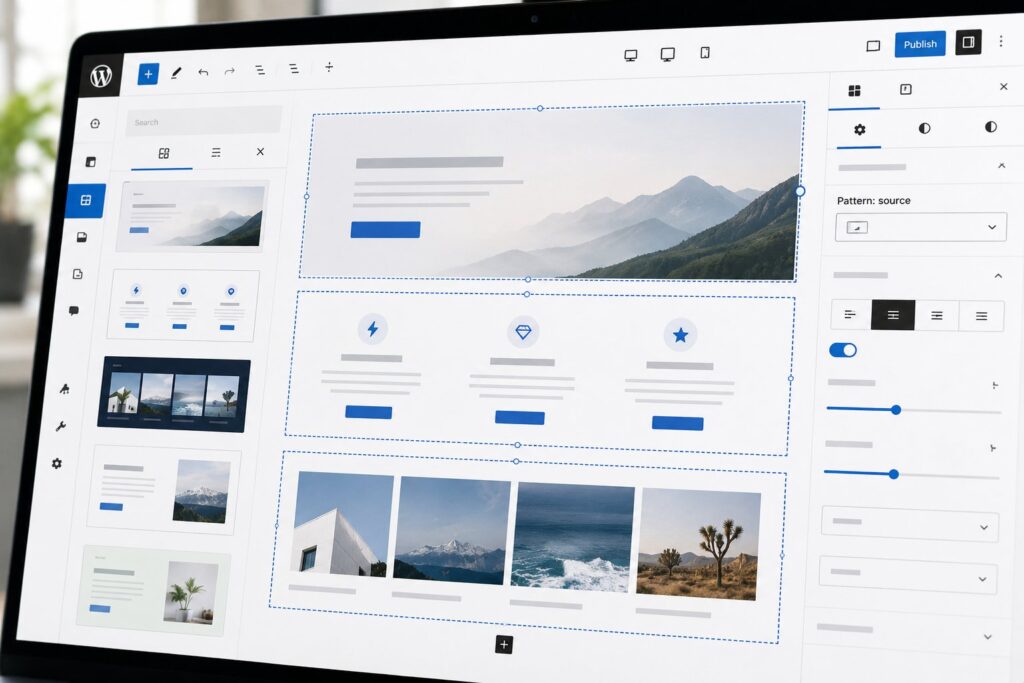
After WordPress 7.0, inserting a pattern creates a wrapper block whose inner content is the pattern’s block markup. The wrapper retains a reference to the pattern source. The editor displays the wrapper as a single block with its constituent pieces editable inside. When the pattern source is updated, the editor offers to propagate the update to existing instances. The wrapper can be detached from its source (turning it back into the stamp model) by an explicit user action. This is the "component" model: the pattern is a component that retains identity after instantiation.
The new behavior is closer to how reusable blocks worked before WordPress 7.0. Reusable blocks have been "components" all along. The difference is that reusable blocks were always all-or-nothing globally synchronized, while the new pattern model gives the user a choice. A pattern instance can be either a synchronized component that updates with its source, or it can be detached from its source for independent customization. The choice is per-instance and reversible (a detached instance can be re-attached, with the user resolving any conflicts).
The user interface for the choice is a control on the pattern wrapper block. The control reads "Pattern: [source name]" with a dropdown that offers "Update from source," "Detach from source," and "Reset to source." A detached pattern loses its source reference and becomes a regular set of blocks. A re-attached pattern is treated as a new instance of the source. The pattern source can be a theme-supplied pattern, a user-saved pattern, or a pattern fetched from the WordPress.org pattern directory.
Editor performance
The first effect of the change that any user notices is in editor performance for pages built from patterns. Under the old model, a page built from 20 patterns was rendered as a few hundred blocks in the editor. Every block was independently tracked in the editor state, every block had its own focus and selection handling, and every block participated in the editor’s render loop. For complex pages, this was the dominant cost.
Under the new model, a page built from 20 patterns is rendered as 20 blocks in the top level of the editor. Each pattern’s internal blocks are rendered lazily when the pattern is focused or expanded for editing. The editor state at the top level is dramatically simpler, and the render loop is dramatically faster. The user experience is that page load in the editor is faster, scrolling is smoother, and the editor feels more responsive on pages with many patterns.
The lazy-rendering of internal pattern blocks has a tradeoff. When the user expands a pattern for editing, there is a brief delay (typically under 100 milliseconds for patterns with a dozen inner blocks; up to half a second for patterns with several dozen) as the inner blocks render. For most patterns this is imperceptible. For patterns that are unusually large, the expansion delay is noticeable. The practical guidance for theme developers is to keep patterns reasonably small (a dozen inner blocks is a comfortable ceiling) and to compose large pages from many small patterns rather than from one or two enormous patterns.
A second performance consequence is in document size. The pattern-as-component model stores the pattern’s source reference plus the constituent block markup, where the old model stored only the constituent block markup. This is a small per-pattern overhead in document size. For a page with many patterns the overhead accumulates, though in absolute terms it remains small relative to the markup itself.
Pattern-update propagation
The single most-asked-for feature in the old pattern model was the ability to update an existing pattern instance after the source changed. The new model delivers this with the propagation controls described above. When a pattern source is updated, the pattern wrapper detects the source change on next editor load and displays an "Update available" indicator. The user can choose to accept the update for that instance, ignore it, or detach the instance to opt out of future updates.
The propagation behavior is per-instance, not site-wide. A theme update that changes a pattern does not automatically push the change to every page that uses the pattern. The change is staged and surfaced as an offered update. This is the right default for several reasons. The first is that pattern instances often have local customizations (a heading with different text, a button with a different URL) that the user does not want overwritten. The second is that site editors want visibility into what is changing on which pages. The third is that automatic propagation creates risk of unintended visual changes propagating across many pages from a single source edit.
The propagation surface treats local customizations carefully. When a user accepts an update, the editor performs a three-way merge between the previous source, the new source, and the current instance. Customizations that do not conflict with the new source (a changed heading text where the heading itself is unchanged) are preserved. Customizations that conflict with the new source (a heading was a paragraph in the new source) are surfaced to the user for resolution. The merge is conservative: when in doubt, it preserves the user’s customization rather than overwriting it with the source.
Theme developers have a new responsibility under the propagation model. A pattern source change can now affect many existing pages. The practical guidance is to think about pattern source changes the way one thinks about API changes: a breaking change to a pattern (renaming a block, removing a slot) will produce merge conflicts on many instances. A non-breaking change (adjusting a class name, fixing a typo) propagates cleanly. Theme developers maintaining pattern libraries are being asked to communicate change notes for pattern updates the way developers communicate library version notes.
Theme developer workflow
The theme developer workflow for maintaining a pattern library has changed in three concrete ways. The first is that patterns now have an explicit version field in their PHP registration. The version is incremented when the pattern source is updated, and the version is what the propagation system uses to detect changes. A pattern without a version is treated as version "0" and never offers updates after first insertion, which is the backward-compatible fallback for themes that have not adopted the new system.
The second change is that patterns can now declare "slots" inside their markup. A slot is a marked region of the pattern that the user is expected to customize. Slots are not enforced (the user can edit anywhere in the pattern), but they participate in the merge logic when propagation happens. Edits inside a slot are preserved across propagation by default, while edits outside slots are flagged as conflicts. The slot mechanism gives theme developers a way to express "here is where users are expected to customize" as a structural declaration rather than as a comment in documentation.
The third change is that the pattern preview UI in the inserter has been redesigned to surface the propagation behavior. A user inserting a pattern sees not only the pattern’s preview but also an indicator of whether the pattern will be synchronized with its source after insertion, and whether the pattern source comes from the theme, from a user-saved pattern, or from the directory. The indicator is small but consistent, and over time it shifts user expectations about how patterns will behave after insertion.
A practical theme-developer pattern that has emerged is the "hero pattern with multiple variations." The theme ships several patterns that share a common structure (a hero with a heading, a subheading, and a call-to-action) with different visual treatments. Each variation has its own version. When the theme is updated and the variations’ visual treatments change, users see the propagation offer on each affected page and can accept or detach per page. The pattern is more maintainable than the old model where every variation became disconnected after insertion.
Migration considerations
Sites that have been built on WordPress 6.x and upgrade to WordPress 7.0 face a migration question. Existing pattern instances were inserted under the old "stamp" model and have no source reference. Under the new model they are treated as detached patterns: they continue to work, they display normally, they edit normally, but they do not participate in propagation. There is no auto-conversion from old detached instances to new synchronized instances.
The site editor or content manager can optionally re-attach old instances to their source. The mechanism is to insert a fresh instance of the pattern, copy customizations from the old instance into the fresh instance, and delete the old instance. The result is a synchronized instance that will participate in future propagation. This is a manual process and is not necessary for sites that prefer to leave existing pages in their detached state.
Sites that depended on the old behavior for site-wide customization of pattern instances need to consider how the new model affects that work. The old model’s strength for some workflows was precisely that pattern instances were independent. A theme that shipped a pattern and a site editor that customized the heading text on every instance was working with independence as a feature. Under the new model, accepting a pattern update can overwrite local customizations if they conflict, which is a change in behavior. The mitigation is either to use slots (which preserve customizations across propagation) or to detach instances explicitly when independence is the desired behavior.
The migration story is gentle in practice because the new model defaults to preserving existing behavior. A site that does not opt into propagation continues to work exactly as before. A site that wants the new behavior can adopt it incrementally, one pattern instance at a time. There is no forced migration and no upgrade-blocking compatibility issue.
What this enables
The pattern-as-component model unlocks a set of theme-developer and site-editor workflows that were difficult or impossible under the old model. The first is genuine pattern libraries that can evolve over a site’s lifetime. A theme that ships a comprehensive set of patterns can update the patterns through theme releases and have those updates propagate to existing content under the user’s control. This is the workflow that design system tools like Figma libraries, Storybook, or Pattern Lab have offered for engineering teams; the new model brings it to WordPress.
The second is the use of patterns as a sites-wide consistency mechanism. A site with a hundred pages that all use a "section header" pattern can update the section header pattern once and propagate the change to all hundred pages. Under the old model this would have required a hundred manual edits. The new model makes consistency-maintaining workflows feasible at a scale that the old model could not support.
The third is the pattern marketplace dynamic that the WordPress.org pattern directory has been building toward. A pattern shipped via the directory now has a meaningful update channel. When the pattern’s author releases a new version, sites using the pattern see the update offer and can accept it. The dynamics are similar to how plugin updates work, which is a mature and well-understood pattern in the WordPress ecosystem. The pattern directory has not yet seen widespread update activity in the first few weeks of WordPress 7.0, but the infrastructure is now in place for the dynamic to develop.
What is not yet solved
The pattern-as-component model is the right architectural direction but does not solve every pattern-related need. The first unsolved area is patterns with structured data fields. A pattern that includes a list of three items where each item has a heading and a description is still represented as a fixed set of blocks. There is no first-class data structure for "list of N items." The result is that variable-length data in patterns still requires either constructing the list at the block level (no schema, no validation) or using a separate field plugin (ACF or Meta Box) and composing the pattern around the field. The pattern model does not yet replace the role that custom fields play for structured content.
The second unsolved area is patterns that need to participate in the theme’s design tokens at runtime. A pattern can declare class names in its source markup, and those classes can be styled by the theme. But a pattern cannot dynamically respond to the theme’s design tokens (colors, spacing, type scale) in a way that lets a single pattern adapt to whatever theme it is rendered under. Some patterns are intentionally theme-specific and this limitation is acceptable. Others are intended to be theme-portable and the limitation is meaningful.
The third is patterns as a target for AI generation. The Connectors API in WordPress 7.0 (covered in the AI Foundations companion piece) lets a plugin invoke an AI provider to generate content. The natural pattern would be for AI-generated content to instantiate as a synchronized pattern with an "AI-generated" indicator, so the user could regenerate, refine, or update it through a single interface. This integration does not yet exist in WordPress 7.0 core, though the underpinnings are present for it to be built. Expect to see it in WP 7.1 or in third-party plugins.
Frequently asked questions
Are reusable blocks still a thing in WordPress 7.0?
Yes. Reusable blocks continue to work and they continue to be globally synchronized. The pattern-as-component model is positioned as the more flexible option that supports both synchronized and detached behavior per instance. The two concepts overlap and the long-term direction is probably consolidation, though no migration plan has been announced as of WordPress 7.0.
Does a pattern with slots work in older WordPress versions?
No. Slots are a WordPress 7.0 feature. A theme that ships patterns with slots will need to either gate the slot feature on a WordPress version check or accept that the slots are simply ignored on older versions. The fallback behavior is graceful: on an older version, the pattern works as a regular pattern and the slot markers are treated as no-ops.
Can I prevent users from detaching pattern instances?
No. Detaching is a user action and the editor does not support locking instances against detachment. The closest available control is to make the pattern read-only at the block level using the block-lock feature, which prevents the user from editing the pattern content. A locked pattern can still be detached and then unlocked, so the lock is a soft control rather than a hard one.
How does the pattern model interact with full-site editing?
Full-site editing templates and template parts are independent of patterns. A template can include a pattern, in which case the pattern follows the same rules as it would in a post or page. A template part is its own concept (more like a reusable block at the template level) and is not affected by the pattern-as-component change.
Is the propagation behavior available for patterns from the WordPress.org directory?
Yes. A pattern inserted from the directory carries the source reference back to the directory URL. If the directory pattern is updated, the editor will offer the update on next load. This is the dynamic that the pattern directory has been working toward for several years.
What happens to pattern instances if I switch themes?
Instances of patterns from the previous theme will continue to render their stored block content, but they will lose their source reference if the new theme does not ship a pattern with the same identifier. The instance becomes a detached pattern, which is the safe fallback. If the new theme happens to ship a pattern with the same identifier, the instances re-attach automatically and can receive updates from the new theme’s pattern.
Can I write a pattern that includes a nested pattern?
Yes. A pattern’s source markup can include other patterns by reference. The nesting works recursively, with the propagation model applying at each level. Theme developers should be cautious with nesting depth because the propagation logic has to consider all levels, and deep nesting can produce confusing merge conflicts when an inner pattern is updated.
Does pattern caching work with the new model?
Yes. The pattern’s rendered markup is cached the same way it was before. The pattern wrapper adds a small amount of editor-only metadata but does not affect the rendered output that the site serves to visitors. Caching behavior is unchanged from a site-performance perspective.